Wady Central is one system for your outlets, your central kitchen and your suppliers, for any size of kitchen from one café to a multi-branch group. It runs as one loop: a supplier's delivery goes into stock, Wady Central costs your recipes from it, the kitchen plans production from outlet orders and sends to the outlets, and waste, counts and reports read the same records. This guide follows the loop step by step and links each step to its own guide.
Key takeaways
Wady Central follows one loop, from the supplier's delivery to the outlet's confirmation.
Eight pages in the sidebar cover it: Orders, Daily Brief, Recipes, Production Plan, Stock, Dispatch, Reports and Control.
Every movement carries a reason, a document, a date and its value, and nothing is locked or deleted.
What is Wady Central for?
In many kitchens the answer to "did the delivery arrive?" or "why does this dish cost more now?" sits in five places: the chef's memory, a WhatsApp group, the delivery book at the back door, a spreadsheet on one laptop and a supplier invoice that comes weeks later. Wady Central keeps one record instead: each delivery, batch, dispatch and bin of waste gets a dated line with its reason and document, so you can explain any number. New to the term? Start with what a central kitchen is.
How does Wady Central work, step by step?
You receive the supplier's delivery. On Stock, the Receive tab lists the deliveries you are waiting for. Lines come pre-filled from the order, so you check what turned up, and Wady Central flags price changes. See receiving a delivery and price changes on delivery.
Stock holds the balance. Stock keeps ingredients and finished products on one list. Every balance opens to its full history, and a negative balance gets a flag. See stock movement history.
Wady Central costs your recipes. Recipes costs each dish on what you can use after trim, and re-costs it when a price moves. See costing a recipe with yield and trim loss.
The kitchen plans from outlet orders. Outlets order from your kitchen. Orders collects them, and Production Plan turns them into what to make and what to buy, after what is already in stock. After the cooks make the batch, you record the run: ingredients out, finished portions in. See the daily production plan.
The kitchen dispatches and outlets confirm. On Dispatch, the kitchen sends each delivery and prints its delivery note. The delivery stays on an in-transit list, with its value and age, until the outlet confirms it. See delivery notes for outlets.
You record waste. You enter a shift's waste as one entry, with your reasons. See how to track food waste.
You count the shelf. You count on paper or on screen and review the differences before you post anything. See the stock count.
Daily Brief and Control read it all. Daily Brief is a morning read of what looks wrong and what changed, in riyals. Control shows what happened across receiving, dispatch, stock and production. Both only read. See the Daily Brief.
Reports show month-end. Reports gives each item's month-end: opening balance, plus what came in, minus what went out, equals closing balance. See month-end reconciliation.
Where can you see the whole loop at once?
The Control page shows it. It lists price changes, warnings someone went ahead with, deliveries in transit and balances below zero.
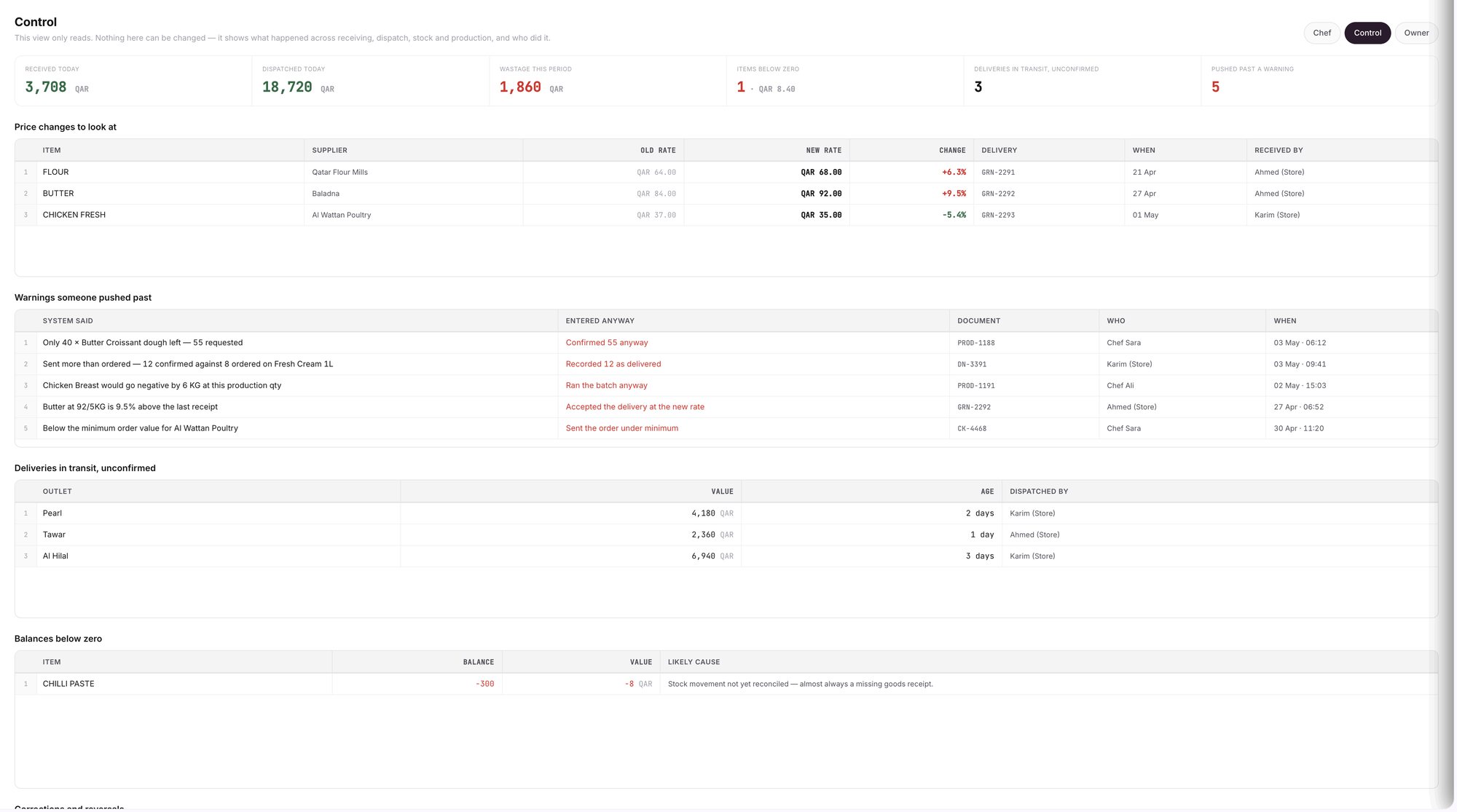
An example screen: the Control page reads across receiving, dispatch, stock and production.
Which rules does every step follow?
Nothing is locked or deleted. You fix a mistake with a new, visible, dated correction.
You can trace every figure to a document. Each movement carries its reason, its document, its date and its value at the time.
The chef decides. Wady Central does the arithmetic and does not forecast.
Related guides
Frequently asked questions
Did this guide answer your question?
Didn't find your answer?
Message us on WhatsApp or by email, and our team will get back to you.
Your kitchen's stock, recipes and costing, with numbers from real records.

