Goods Receiving Procedure: How to Check and Record a Supplier Delivery
By Asaad Al Hashmi, Founder and CEO of Wady
A goods receiving procedure is the set of checks you make at the door before a delivery becomes your stock: compare it with the order, count and weigh it, check dates and temperature, record any shortage or price difference, and sign. A routine you repeat catches short deliveries and wrong prices before they turn into a stock problem. This guide gives the seven steps, a checklist and what to do when a delivery is wrong, then shows how to receive in Wady Central.
Key takeaways
Check each delivery against the order at the door, before you sign.
Record the quantity that arrived and the price charged.
Write down shortages, rejected goods and price differences on the day, while the driver is still there.
In Wady Central you receive from the Receive tab of the Stock page, with lines pre-filled from the order, and a matching delivery takes one click.
Why do problems with deliveries show up late?
The door is the only place where the check is cheap. Once the driver has left, a missing case is hard to prove, a warm chilled item is already in your fridge and a higher price is already in your books. The gap shows up later as a count that comes in below your records and a food cost that runs above what your recipes say. A receiving routine moves the discovery to the one moment you can still fix it. See how to run a stock count and review the variance.
How do you receive a supplier delivery, step by step?
You receive a delivery by checking it against the order, line by line, before it goes into storage, and recording what you accept.
Have the order in front of you. Print it or open it on a screen. You cannot check a delivery against an order you are not looking at.
Check the vehicle and the packaging. Goods should arrive clean and closed, and chilled or frozen items in a cold vehicle. Refuse anything damaged or leaking.
Count and weigh on your own scale. Count the cases and weigh the loose items. Do not rely on the driver's figures.
Check dates and temperature. Read the expiry and use-by dates. Measure chilled and frozen goods with a probe against the limits in your food safety plan.
Compare the price. Read the price on the delivery note line by line against the agreed price.
Record each difference. Write short quantities, rejected goods and price differences on the delivery note while the driver is there.
Sign for what you accepted, then store it. Move chilled and frozen goods to cold storage first.
What should a receiving checklist include?
Check | What to look at | What to record |
|---|---|---|
Order | Items and quantities against the purchase order | Ordered and received quantity |
Count and weight | Cases counted, loose items weighed | Quantity received |
Condition | Damage, leaks, open packs, wrong size or brand | Rejected quantity and the reason |
Dates | Expiry and use-by dates | Any short-dated line |
Temperature | Chilled and frozen goods, measured with a probe | The reading, and a refusal if it fails |
Price | Delivery note price against the agreed price | Price charged and any difference |
Paperwork | Delivery note or invoice number, supplier, date | Document number and who received |
Signature | Only what you accepted | Name and signature |
ℹ️ Tip: Keep these columns on a goods received note, whether it is a printed form, a spreadsheet row or a screen. It is the record you open when a supplier disputes a delivery.
What do you do when a delivery is short, wrong or damaged?
Short. Record the quantity that arrived. Tell the supplier the same day and agree whether the rest is coming or you cancel the line.
Wrong or damaged. Reject the line at the door and write the reason. If you keep it anyway, say so on the note and ask the supplier for a credit in writing.
Price difference. Compare it with the agreed price before you sign. See what to do when a supplier's price rises on delivery.
Example: you order 20 cases of tomatoes at QAR 40 a case, QAR 800 in all. 18 cases arrive and 2 of them are rotten. You reject the 2, accept 16, and record 16 received, 2 rejected and 2 not delivered. You owe 16 x QAR 40 = QAR 640. These numbers are an example.
How do you receive a delivery in Wady Central?
In Wady Central you receive from the Stock page. The lines are pre-filled from the purchase order, so you check what turned up, and a delivery that matches takes one click. See the purchasing page.
Open the delivery
Open Stock and click the Receive tab. It shows how many deliveries are due.
In the Expected list, open the delivery that arrived. Each line comes pre-filled with what the order says.
Check each line
If the delivery matches the order, click All arrived as ordered.
If it does not, change the numbers on the lines that differ. Received is what arrived, Rejected is what you refused and Charged is the price the supplier charged. Goods in Rejected never enter stock.
Read the columns on the right. Variance reads matches when the price charged is the price the supplier confirmed. New rate shows a price change as a percentage. Lands in stock shows the quantity in your kitchen's units, for example 4 blocks of 5 KG as 20 KG.
Answer the pack question
The first time a pack arrives that Wady has not seen, a dark panel asks what it is in your kitchen. It suggests an item and a size, for example that one sack holds 25,000 GM. Check the number, change it if it is wrong and click That's right. Wady remembers the answer, so it asks once.
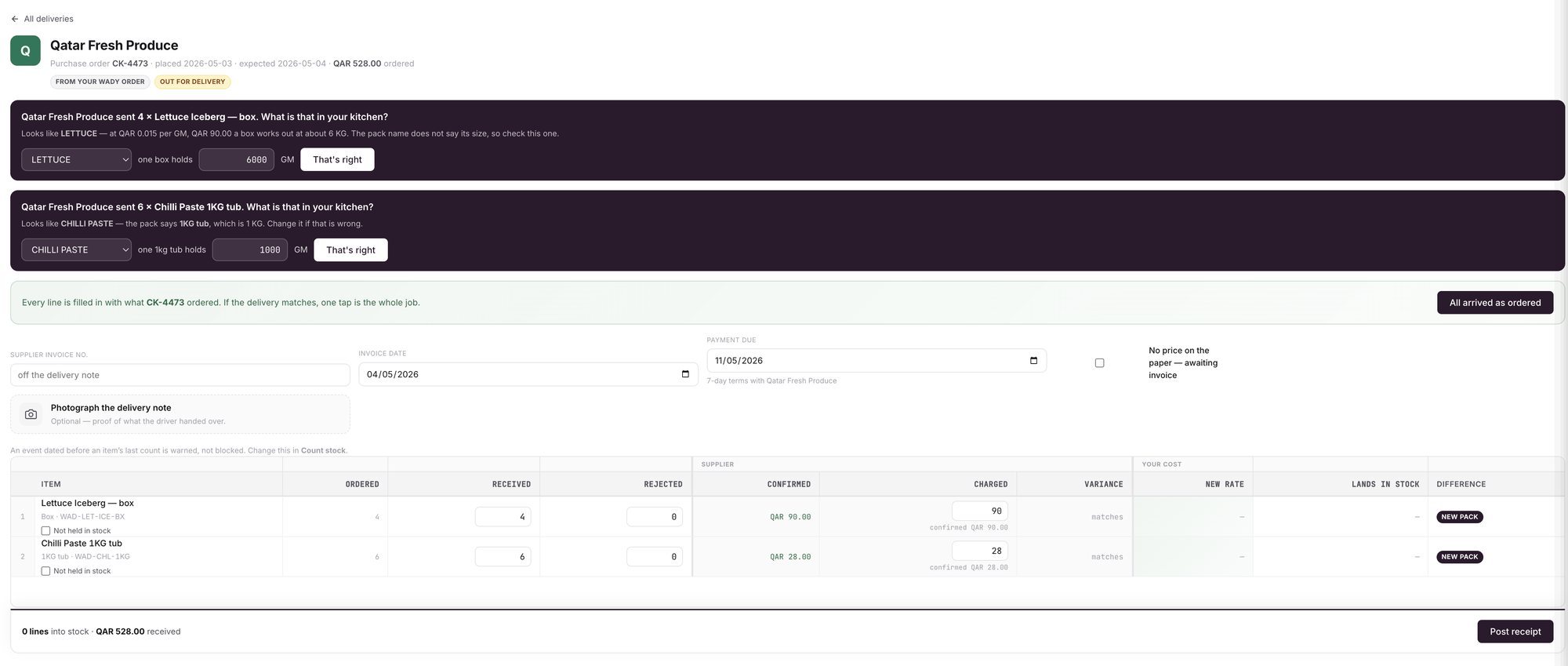
An example screen: a delivery against an order, with the pack questions at the top and Post receipt at the bottom.
Add the paperwork and post
Add the supplier invoice number and invoice date from the delivery note. The Photograph the delivery note tile is optional proof of what the driver handed over.
Check the footer, which shows how many lines go into stock and the value received, then click Post receipt.
Which warnings can appear?
Price alert: if a price is more than three times the item's current cost, an amber banner starting Price alert appears. It ends with "You can still post the receipt." See why Wady double-checks unusual numbers.
This delivery changes what 1 recipe cost: when a price changed, a yellow banner says how many recipes change cost and shows each recipe's cost before and after.
An entry dated before an item's last count gets a warning, and you can still post it.
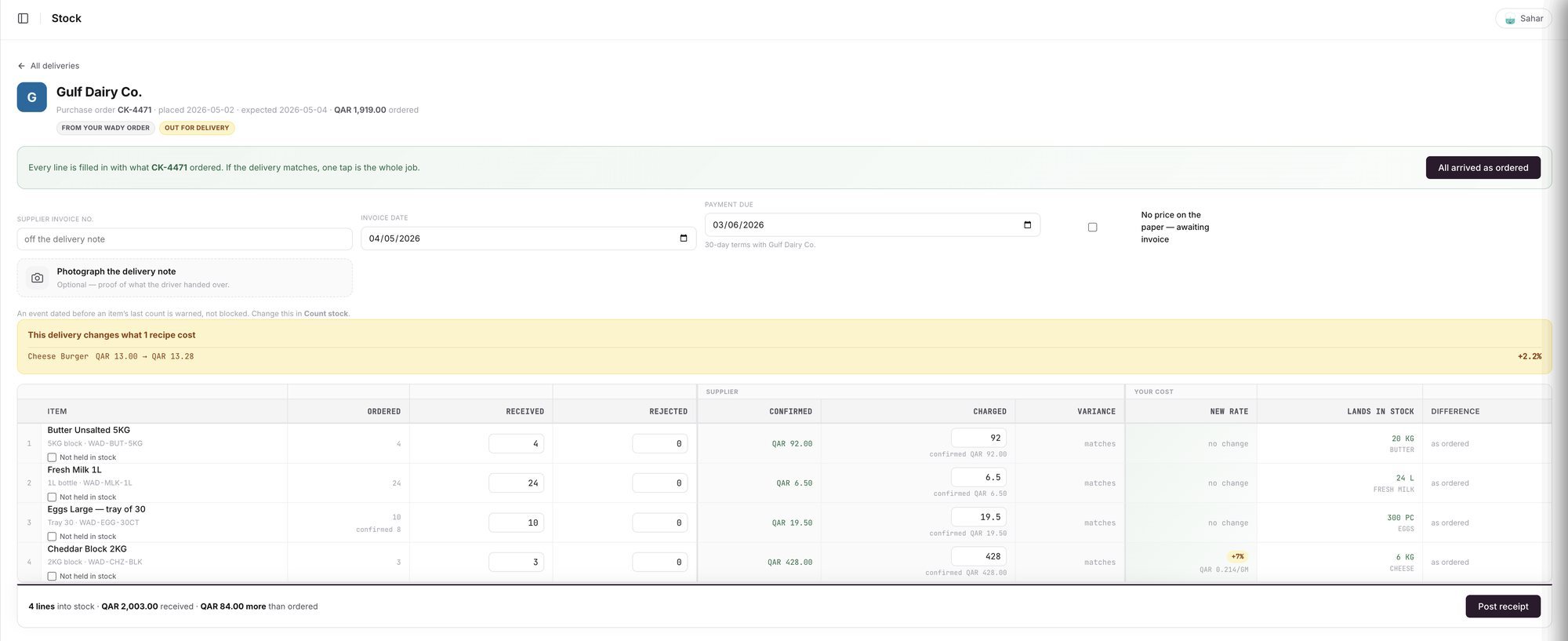
An example screen: one line shows a new rate, and the banner shows the recipe it changes.
Where does the delivery show up?
In the item's history on Stock, as a Received line with the supplier and a receipt number that starts with GRN-. See stock movement history.
On the Price changes tab, if a price moved.
On the Daily Brief, if a delivery was due and has no receipt. See the Daily Brief.
What does Wady Central not do?
It cannot count, weigh or measure for you. The person at the door still checks the goods, the dates and the temperature.
It does not read the supplier's paperwork. You enter the quantities and prices.
It does not create credit notes or claims for the supplier.
It does not connect to your accounting system.
The interface is in English.
Related guides
Frequently asked questions
Did this guide answer your question?
Didn't find your answer?
Message us on WhatsApp or by email, and our team will get back to you.
Your kitchen's stock, recipes and costing, with numbers from real records.

