Daily Production Plan for a Central Kitchen: Steps and Format
By Asaad Al Hashmi, Founder and CEO of Wady
To plan daily production, start from the outlet orders you have confirmed, take off what is already made or in stock, add a small buffer, and round up to whole batches. The result is two lists: a prep list for the cooks and a buying list for what you are missing. This guide shows what a daily production plan should hold, a worked example, and how to build the plan in Wady Central.
Key takeaways
Plan from confirmed outlet orders. Take off what is already made or in stock before you set a target.
Add a small buffer to what you cook, then round up to whole batches.
One plan gives two lists: a prep list for the cooks and a buying list for what stock does not cover.
In Wady Central the outlets' orders land on one page and flow into the Production Plan, which shows how each number was reached.
Why does a central kitchen need a daily production plan?
Outlets order in portions and the kitchen cooks in batches. Without a plan, the kitchen cooks too much and the extra goes in the bin, or too little and an outlet receives less than it ordered. A written plan puts the arithmetic where the chef can check it before the first pan is on.
How do you plan daily production, step by step?
Work from confirmed demand down to batches, then down to ingredients.
Close the day's orders. Pick a time after which a new outlet order counts as late, and plan from the orders you have confirmed.
Put every order on one page. Products down the side, outlets across the top, a total for each.
Take off what is already made. Subtract finished portions in the chiller. The rest is what you still need.
Add a buffer to what you cook. A small percentage covers a burnt tray or a late extra order. Skip it for items you only buy for the outlets.
Round up to whole batches, and add the sub-recipes. A dish that uses a house sauce or dough needs that sauce or dough planned in its own batches.
Split the plan in two. The prep list says what each station cooks. The buying list says what to buy once stock, trim and pack sizes are counted.
Check it with the chef. The chef changes any quantity that does not fit the day.
What should each line of a production plan include?
Column | Example | Why it matters |
|---|---|---|
Product | Lentil soup | What to make |
Ordered | 200 portions | Demand from the outlets |
Already made | 40 | Stops double cooking |
Still needed | 160 | What the kitchen adds |
Batch size | 25 portions | The unit you cook in |
To produce | 175 | Whole batches, buffer in |
The values in this table are an example.
How do you work out the buffer and the batches?
Take the quantity you still need, add the buffer as a percentage, divide by the batch size, and round up to whole batches.
Still needed = ordered - already made
With buffer = still needed x (1 + buffer %)
To produce = batches x batch size, where batches = with buffer / batch size, rounded up
Example: outlets order 200 portions of lentil soup and the kitchen holds 40, so it still needs 160. A 5% buffer adds 8 portions, which makes 168. A batch makes 25 portions, so 168 portions need 6.72 batches, rounded up to 7. The kitchen cooks 175 portions, 15 more than the orders need. These numbers are an example.
ℹ️ Tip: Keep the buffer small. There is no single right number.
How do you turn the plan into a prep list and a buying list?
Cut the plan by station for the prep list, and by ingredient for the buying list. Put sub-recipes first on the prep list, because a sauce or dough has to exist before the dish that uses it. The buying list starts from the usable quantity the batches consume. Take off the stock you hold, add back the trim you lose in cleaning, and round up to the packs your supplier sells. Items the outlets order that you do not cook go straight on the list. See how to cost a recipe with yield and trim loss.
How do you plan daily production in Wady Central?
In Wady Central the plan starts from the outlets' orders, and you can change any quantity.
See the day's demand on one page
Open Orders and click Consolidated Demand.
Switch between By Product and By Branch, and narrow the grid by delivery date or category.
Read each cell as what that outlet still needs. The sheet leaves out anything that has already gone out. Edit a cell down to what the kitchen can make, and the totals update as you type. The TOTAL column and the OUTLET TOTAL row add up each product and each outlet.
Click Print sheet or Export List for a copy, or click Send to Production Plan.
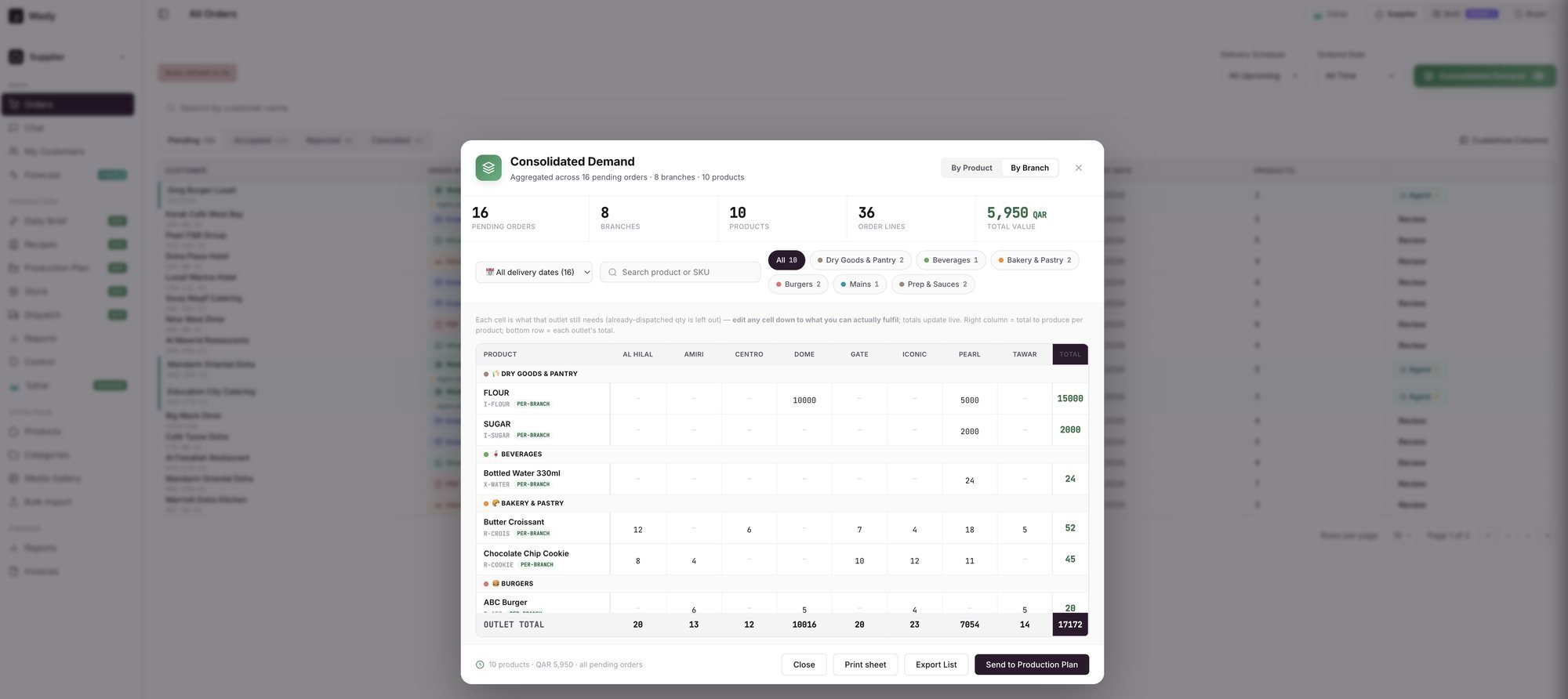
An example screen: the Consolidated Demand window, one column for each outlet.
Turn the demand into a plan
Open Production Plan. Each recipe appears as a target with the tag FROM DEMAND. Change a target and the whole plan re-cuts. To plan a recipe nobody ordered, pick it in ADD and click Add target.
Read ALREADY MADE, STILL NEEDED, BATCH, TO PRODUCE and SPARE. SPARE shows the portions left over from rounding up to whole batches.
Click the fx pill next to a TO PRODUCE number. The popover lists Ordered, Less already made, Still needed, Safety buffer, Batch rounding and To produce.
Set the Waste / safety buffer slider. It applies to what you make, after stock is taken off. The Deduct finished stock and Deduct ingredient stock tick boxes decide whether stock comes off the plan.
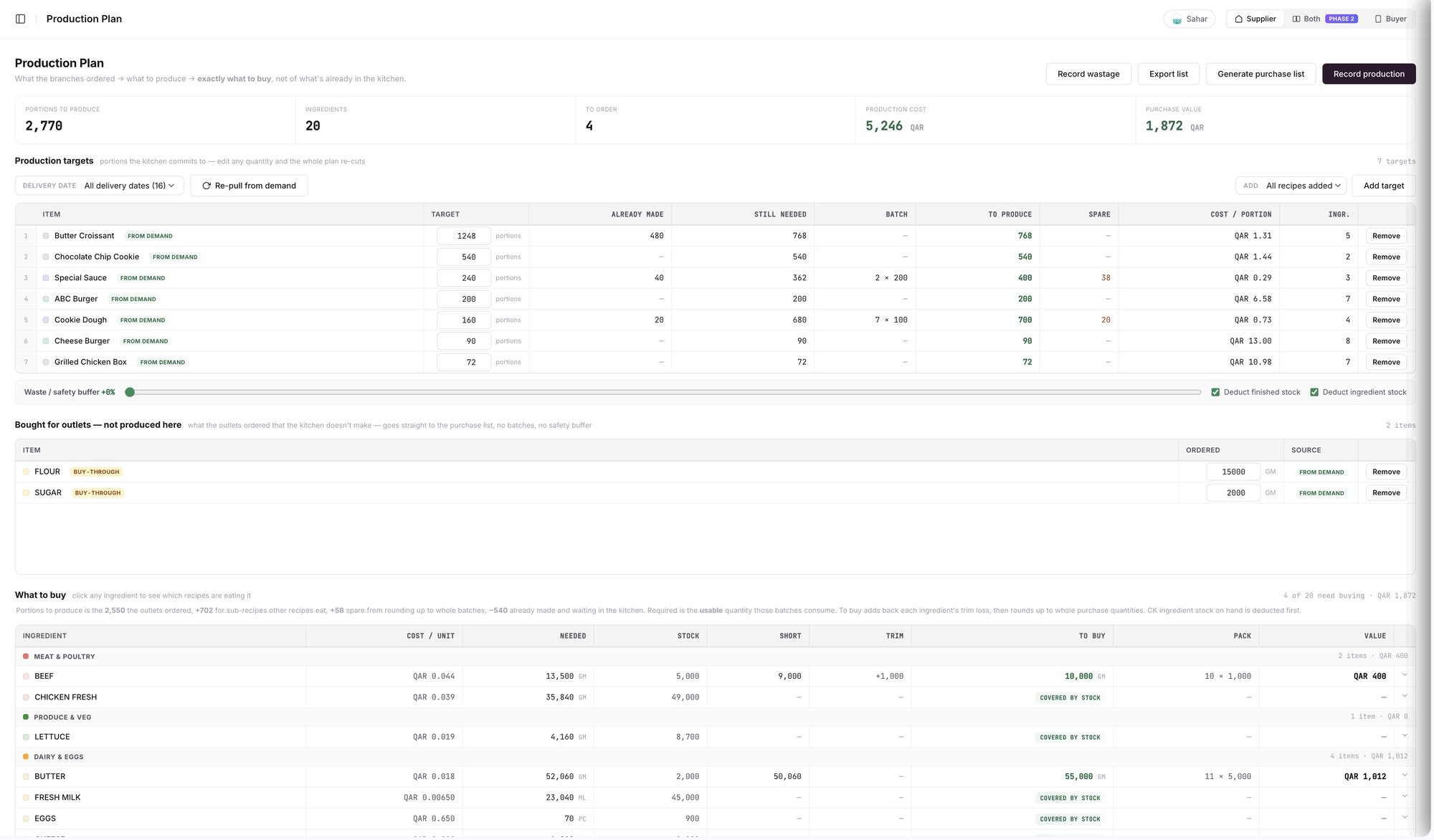
An example screen: the Production Plan, one row for each target.
If a recipe needs a sauce or dough made in house, the plan adds it with the tag NEEDED BY A RECIPE. Items you only buy for the outlets sit in their own table, Bought for outlets, and go straight to the purchase list.
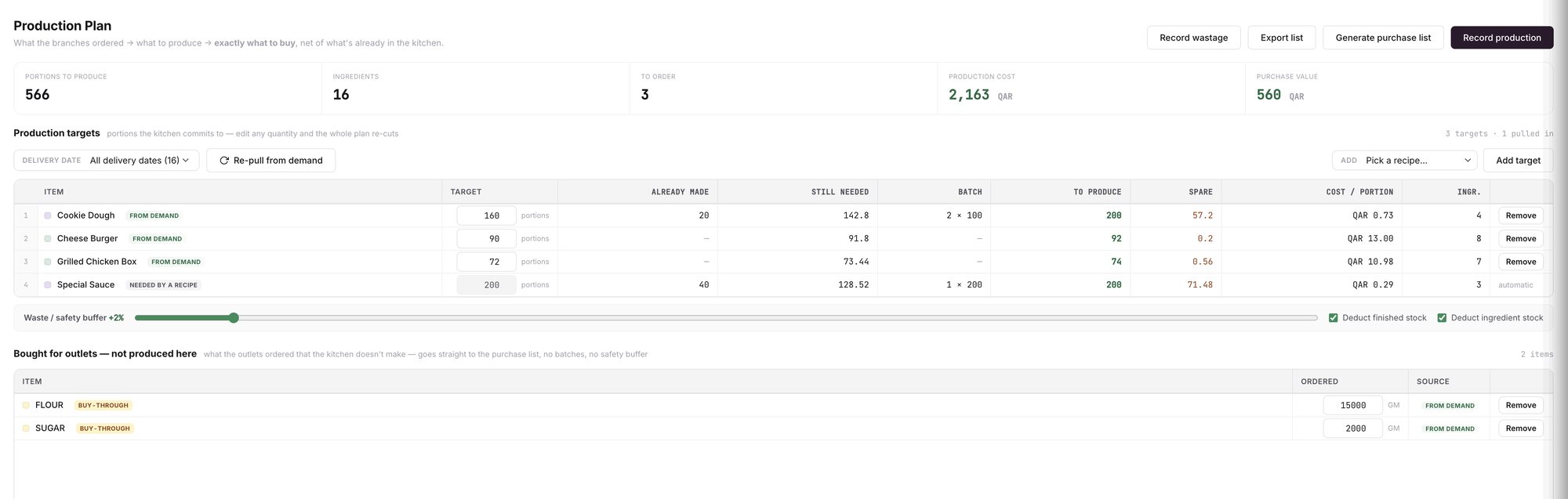
An example screen: the buffer set to a small percentage, and a sauce added by the plan.
Read what to buy and make the purchase list
Scroll to What to buy. Each ingredient shows NEEDED, STOCK, SHORT, TRIM, TO BUY, PACK and VALUE, and COVERED BY STOCK marks one you do not need to buy.
Click Generate purchase list for the purchase list document, or Export list for a file.
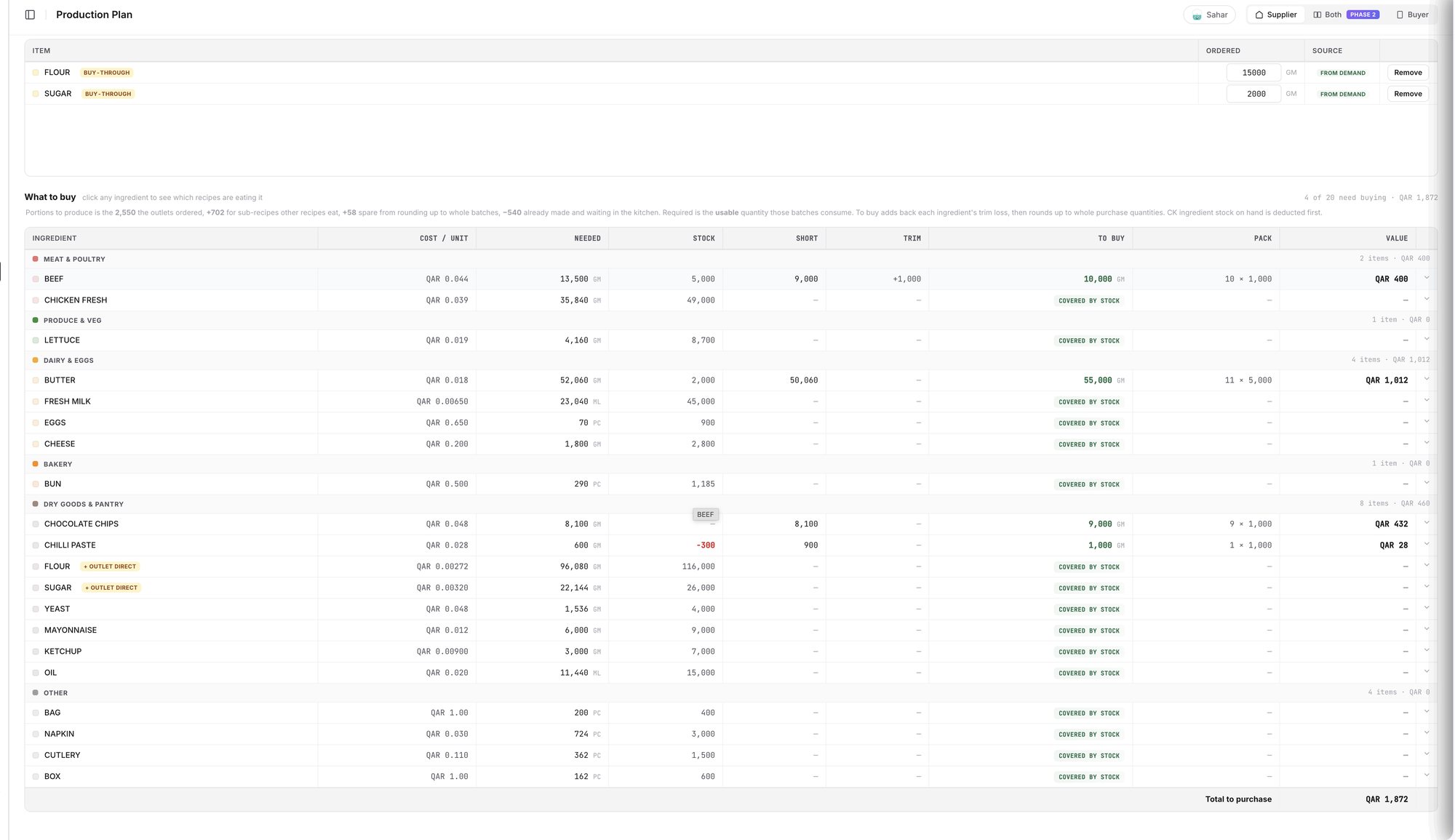
An example screen: the What to buy table.

An example screen: the purchase list document made from the plan.
What should you check before you trust the plan?
Stock balances. A negative balance counts in what you are short. It often means a delivery nobody entered, so fix that first. See why stock goes negative and how to fix it.
Whole packs. TO BUY rounds up to whole purchase quantities, so it can run higher than NEEDED.
⚠️ Watch out: The purchase list calls its prices indicative. Confirm them with your supplier before you order.
Where does the plan go next?
After the kitchen cooks, click Record production. The drawer opens with the plan's TO PRODUCE figures filled in. See how to record a production run.
The outlets' orders you planned for become delivery notes. See delivery notes for outlets.
What does Wady Central not do?
It does not guess tomorrow's orders. The plan starts from the orders the outlets placed and the targets you add by hand.
It does not decide for you. You can change any quantity, and the chef decides what the kitchen makes.
The interface is in English.
Related guides
Frequently asked questions
Did this guide answer your question?
Didn't find your answer?
Message us on WhatsApp or by email, and our team will get back to you.
Your kitchen's stock, recipes and costing, with numbers from real records.

