If a supplier's price is higher on the delivery than the price you agreed, catch it at the door, before you sign. Compare each line with the agreed price, decide on the spot to accept it, query it or send the goods back, and write down what you decided. Then update your recipe costs, because a price you accept raises the cost of each dish that uses the item. This guide shows the method, then how Wady Central flags the change and re-costs your recipes.
Key takeaways
Compare the price on the delivery with the agreed price, line by line, before you sign.
Decide to accept, query or return, and record the decision with the delivery.
Work out what the rise costs per week and per portion before you decide to absorb it or reprice.
In Wady Central, a changed price shows as a percentage on the receiving screen, and recipes that use the item are re-costed.
How do you spot a price increase when the delivery arrives?
You spot it by comparing the price on the delivery note with the agreed price, line by line, before you sign. The agreed price is the one on your purchase order, quote or price list.
Keep the agreed price in sight. The person receiving needs the order, quote or price list at the door.
Read each line. Check the lines of the delivery note or invoice before you look at the total.
Compare per unit. A new pack size can hide a rise: if a 5 kg block becomes a 4.5 kg block at the same price, you pay more per kilo.
Mark each line that differs, even by a small amount.
Write the new price on the paperwork before you sign.
Should you accept, query or return the goods?
Decide line by line, at the door. The right answer depends on whether you agreed to the rise, whether you need the goods today and whether the dish still works at the new cost.
Option | When it fits | What to do |
|---|---|---|
Accept | The rise was agreed, or it is small and you need the goods today | Sign, record the new price and keep the message or note that agreed it |
Query | The price is not what you agreed and nobody told you | Mark the line as disputed on the paperwork and ask the supplier in writing to confirm or correct the price |
Return | You will not pay the new price and the goods can go back | Do not sign for the line, hand it back and record it as rejected |
ℹ️ Tip: Whichever you choose, write it on the delivery note and in your records the same day, so the decision is still visible later.
What does a supplier price increase cost you?
The rise costs you the price difference on each unit you buy, and it moves the cost of each dish that uses the item.
Extra cost per week = quantity bought per week x (new price - old price)
Extra cost per portion = quantity of the ingredient in one portion x (new price - old price)
Example: a kitchen buys 40 kg of chicken breast a week. The price rises from QAR 20 to QAR 22 per kg. The extra cost is 40 x 2 = QAR 80 a week. A portion uses 0.15 kg, so it costs 0.15 x 2 = QAR 0.30 more. If the dish costs QAR 9.00 a portion and sells for QAR 30, food cost moves from 30.0% to 31.0%. These numbers are an example, not a benchmark.
A small rise on one ingredient may not need a new menu price. A rise across several ingredients in your top sellers does. See how to calculate food cost and how to price menu items from food cost.
How do you stop price rises from catching you out?
Keep one agreed price list per supplier and check each delivery against it.
Ask suppliers to tell you before a price changes, and keep their message.
Re-cost your recipes when a price moves, not at month-end. See how to cost a recipe with yield and trim loss.
How do you handle a supplier price increase in Wady Central?
Wady Central shows a price change on the receiving screen, lists each change in one place and re-costs the recipes that use the item. See the purchasing page.
Spot the change while you receive
Open Stock, click the Receive tab and open the delivery. See how to receive a supplier delivery.
Look at New rate. A line whose price changed shows a small yellow tag with the percentage and the new rate per unit. A line with no change reads no change.
Read the yellow banner This delivery changes what 1 recipe cost. It lists each recipe that changes, with its cost before and after.
Compare Charged with the price the supplier confirmed, shown under it. Variance reads matches when they agree.
If a price is more than three times the item's current cost, an amber banner starting Price alert appears. That is a big jump, so check the pack size and the number you typed first. The banner ends with "You can still post the receipt."
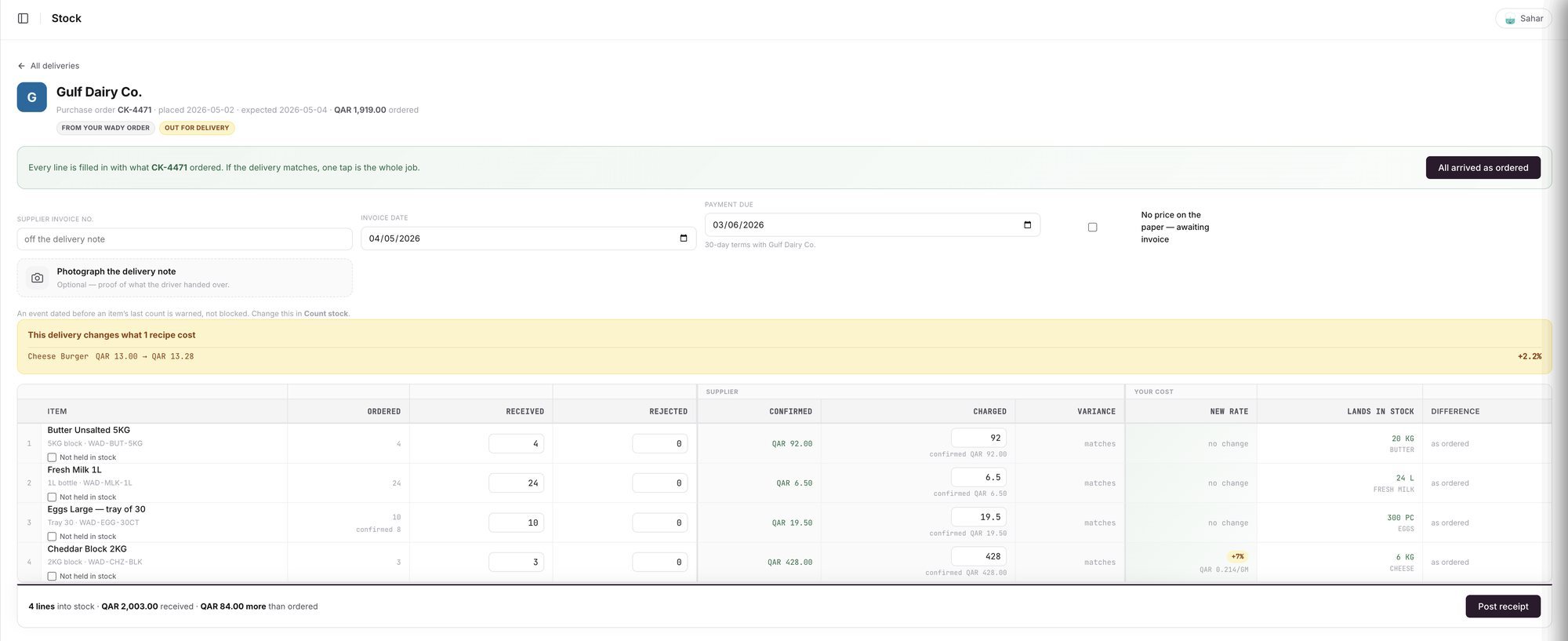
An example screen: one line shows a new rate, and the banner shows the recipe it changes.
Accept, query or return
Accept: click Post receipt. The item's cost updates from the delivery.
Query: if you can wait, ask the supplier before you post. If you need the goods now, post the receipt at the price charged and follow up. The change stays visible on the Price changes tab.
Return: enter the quantity under Rejected instead of Received. Goods in Rejected never enter stock.
See every price change
Open Stock, click Receive, then the Price changes tab. It shows:
Four cards: Price changes, Increases, Decreases and Cost of the rises on stock held.
Two tables, Increases and Decreases, with the item, the supplier, the old and new price, the change in percent, how many recipes it is in and the receipt it came from.
From and To date pickers, and Export CSV.
A table of what each item costs now and what backs it.
The Control page lists the same changes under Price changes to look at, with rises in red and falls in green. The Daily Brief shows which recipes moved cost and which ingredient caused most of the move. See the Daily Brief.
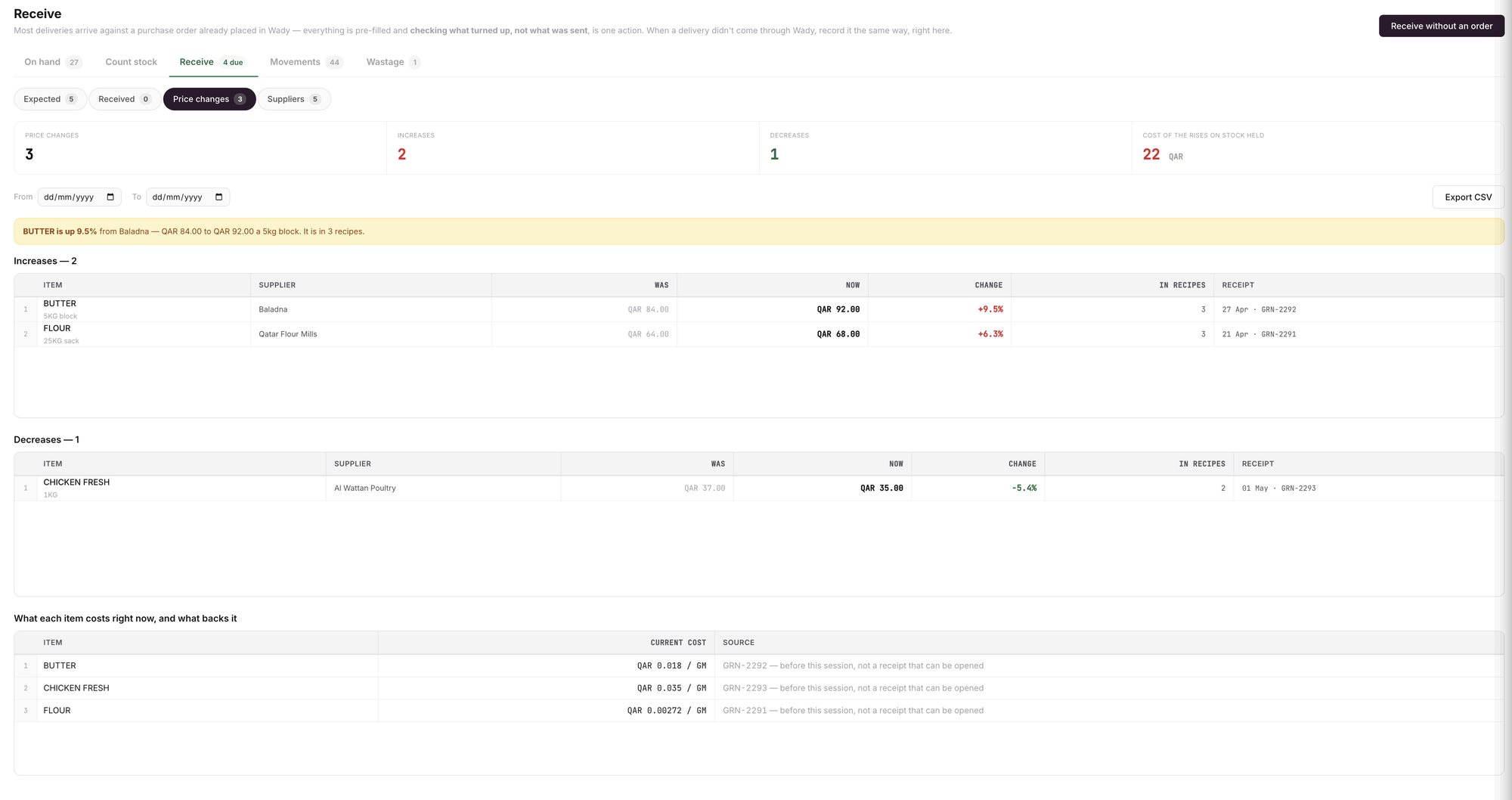
An example screen: the Price changes tab, with increases, decreases and the cost of the rises on stock held.
Check your recipes and menu price
You do not update recipe costs by hand: recipes are re-costed the moment a price moves. Open Recipes to see cost per portion and food cost at your menu price. Wady Central can flag a dish over a target food cost.
ℹ️ Tip: Open a recipe and its Price suggestion table shows food cost and margin at other menu prices. See food cost and margin for each dish.
What does Wady Central not do?
It does not block a delivery or a price. It shows the change and you decide.
It does not talk to the supplier for you, and it does not create credit notes or claims.
It does not change your menu prices. It shows food cost and margin so you can.
It does not forecast prices.
The interface is in English.
Related guides
Frequently asked questions
Did this guide answer your question?
Didn't find your answer?
Message us on WhatsApp or by email, and our team will get back to you.
Your kitchen's stock, recipes and costing, with numbers from real records.
More guides in this topic
How do I receive a supplier delivery?
How do I record a delivery with no purchase order?

