Stock count variance is the gap between what you counted and what your records say you should hold. Work it out for every line as counted minus expected, in quantity and in value, then review the biggest values first. This guide gives the formula, a worked example, the steps to review a variance, and how to review and post a count in Wady Central.
Key takeaways
Variance is counted minus expected, in quantity and in value. A minus means you hold less than the records say.
Read the lines by value, not by percentage. A large percentage on a cheap item can matter less than a small one on an expensive item.
Review in order: recount the big lines, look for a missing movement, then compare the gap with your waste log.
In Wady Central you review every difference before anything is written. Only the lines you counted move, and a blank line stays as it was.
What is stock count variance?
Stock count variance is the gap between the quantity on the shelf and the quantity your records expect. The expected quantity comes from your records: what you opened with, plus what came in, minus what went out as use, waste or deliveries to outlets. Zero means the shelf and the records agree. A minus means you hold less than the records say, and a plus means you hold more. Either one points to a movement that is missing or wrong. For the counting steps, see how to do a stock count in a restaurant.
How do you calculate stock count variance?
Subtract expected from counted, multiply by the cost of one unit, and divide by expected for a percentage.
Variance (quantity) = counted - expected
Variance (value) = variance (quantity) x cost per unit
Variance (%) = variance (quantity) / expected x 100
Example, one line: a kitchen expects 40 kg of chicken breast and counts 36 kg. The quantity variance is 36 - 40 = -4 kg. At QAR 22 per kg, the value is -4 x 22 = -QAR 88. The percentage is -4 / 40 x 100 = -10%.
Do the same for every line, then add the value column for the total.
Item | Expected | Counted | Variance | Cost per unit (QAR) | Value (QAR) | % |
|---|---|---|---|---|---|---|
Chicken breast (kg) | 40 | 36 | -4 | 22 | -88 | -10.0% |
Cream (1 L pack) | 24 | 20 | -4 | 11 | -44 | -16.7% |
Flour (25 kg sack) | 12 | 11 | -1 | 55 | -55 | -8.3% |
Olive oil (L) | 18 | 18 | 0 | 30 | 0 | 0.0% |
Parsley (kg) | 3 | 4 | +1 | 14 | +14 | +33.3% |
Total | -173 |
These numbers are an example, not a benchmark.
The total is -QAR 173. Chicken breast is the line to look at first, because it has the biggest value. Parsley has the biggest percentage but only QAR 14 behind it.
ℹ️ Tip: In a spreadsheet, put counted and expected in two columns and use the three formulas above.
How do you review the variance, step by step?
Review in order, from the cheapest check to the most expensive.
Sort by value. Start with the biggest money line, not the biggest percentage.
Recount the big lines. A wrong unit or a slipped decimal is the cheapest cause to rule out. Recount before you decide anything.
Look for a missing movement. A delivery nobody entered, a production run nobody recorded, a delivery to an outlet nobody entered, or waste nobody logged. Check that item's records for the period.
Compare the gap with your waste log. Waste you logged but did not take off stock explains part of the gap.
Post what is left as an adjustment, with a date and a reason, so the old figure stays visible.
Watch for repeats. An item that comes up short in several counts in a row has a cause: a recipe that is off, a short supplier delivery, or a portion that is too big.
How do you review and post a count in Wady Central?
In Wady Central you count on paper or on screen, review every difference before anything is written, and then post. Only the lines you counted move. Anything you left blank stays as it was.
Count the stock
Open Stock and click the Count stock tab.
Click Download count sheet and take the sheet to the shelves. On the On hand tab the same button carries a number that follows your filter, so you can download a sheet for only the items you filtered, such as items below minimum.
Count on paper, or on screen in the PACKS and LOOSE columns. Wady Central works out = COUNTED. Leave a line blank if you did not count it. Blank means not counted, and only a 0 means none.
If you counted on paper, click Paste / upload and paste or upload the counted sheet.
Click Review variance.
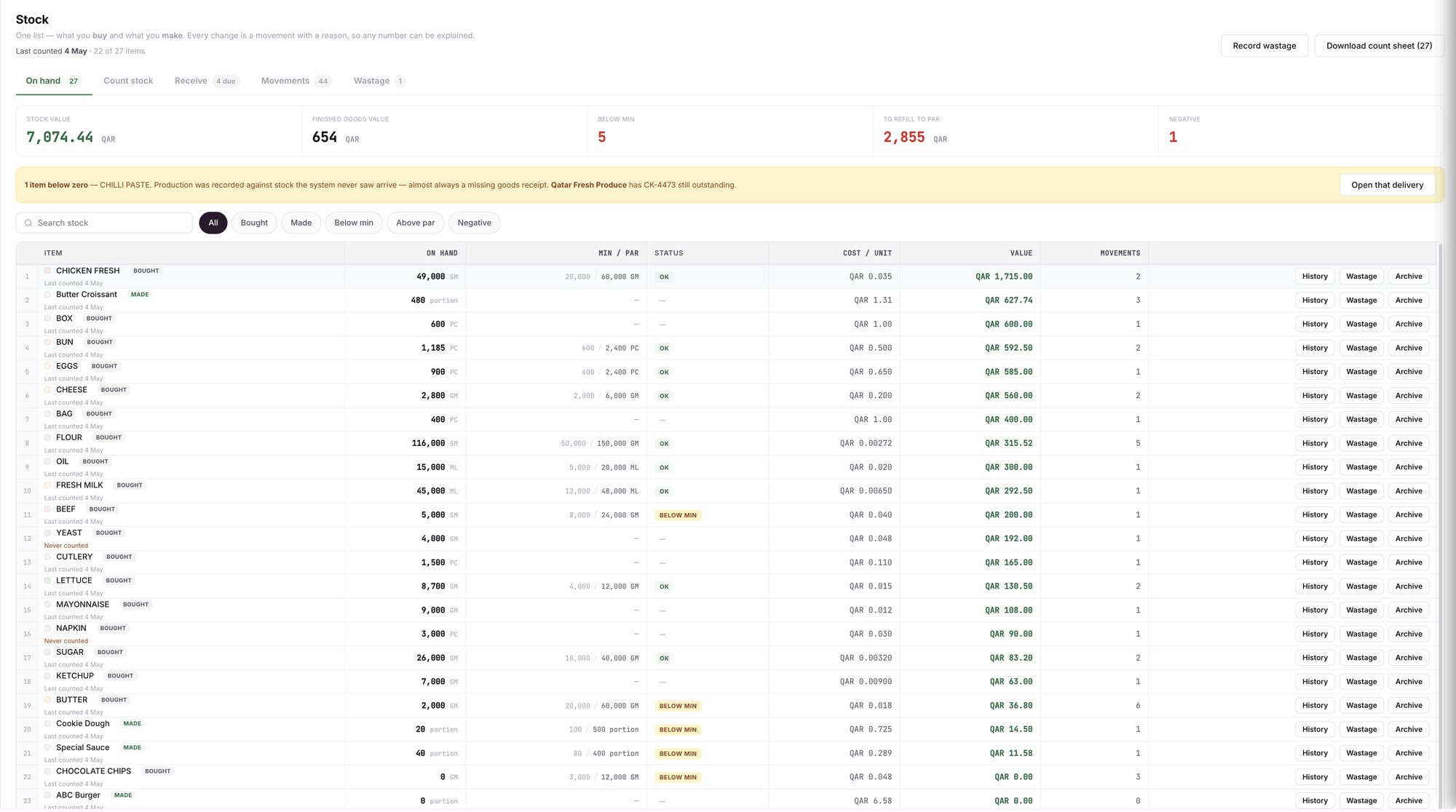
An example screen: the Stock page, with the Count stock tab and the Download count sheet button.
Read the review
The review shows what will move and what will not. Nothing is written until you post.
The cards at the top show COUNTED, NOT COUNTED, COUNTED AS ZERO, VARIANCE QAR and STOCK VALUE AFTER.
Worth a second look lists lines far from the book. A line marked CHECK THE COUNT UNIT is often a unit slip, such as grams typed into the packs box. Nothing is blocked, but check it before you post.
Everything else that moved lists ordinary variance. Each line shows COUNTED, WAS and VARIANCE, in quantity and in QAR.
Not counted lists the items you left blank. They stay as they are, including anything below zero. You can set those items to zero, which writes off their value, or export them as a fresh sheet to count next. Set them to zero only when you know the shelves are empty.
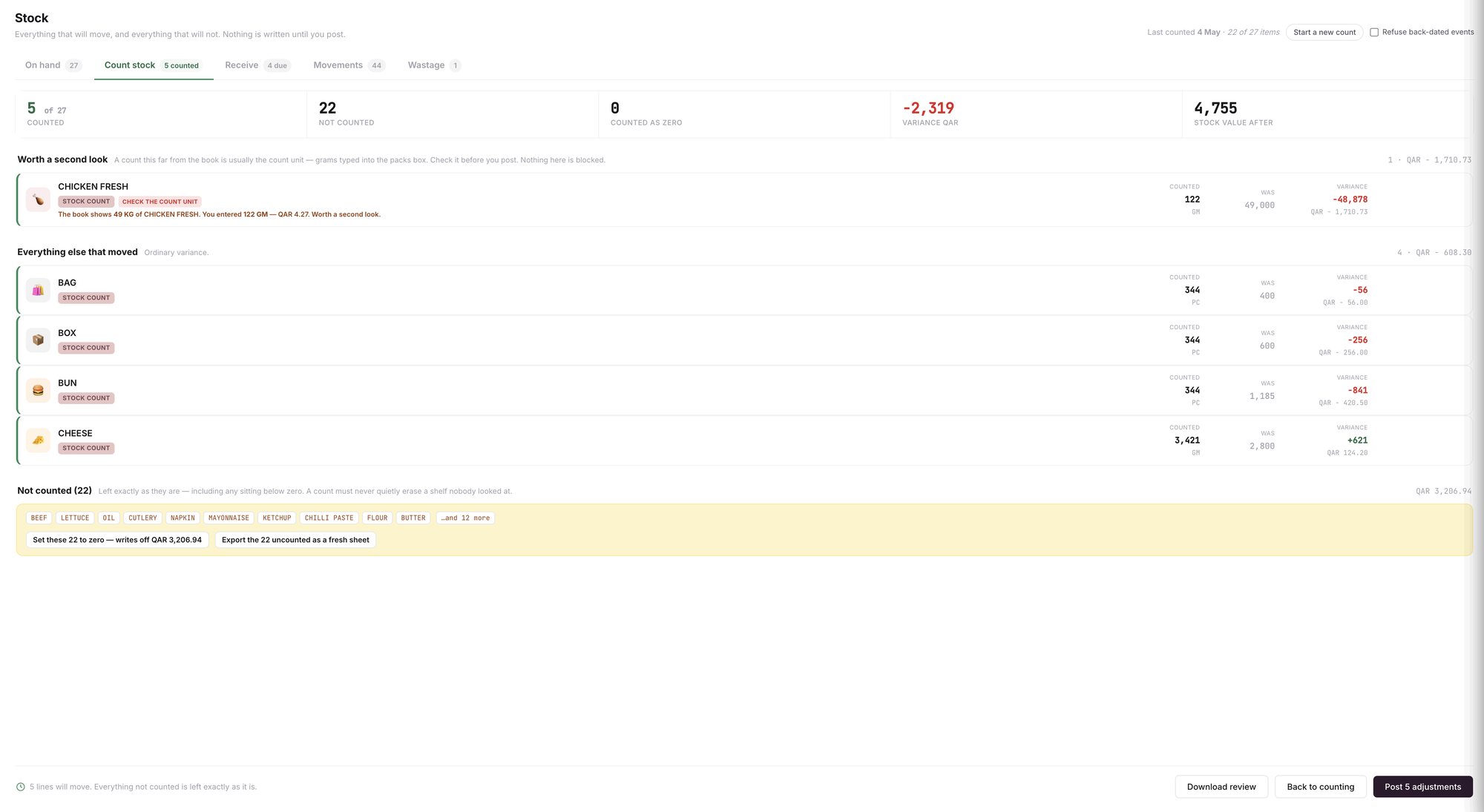
An example screen: the variance review, with the count, the book quantity and the variance for each line.
Post the count
Click Back to counting to fix a line, or Download review to keep a copy.
The dark button at the bottom names how many lines will move, for example Post 5 adjustments. Click it to post.
Posting writes each counted line as a dated adjustment, tagged STOCK COUNT. The old balance stays in the item's history.
Where does the count show up?
The Stock page header and each row show when an item was last counted. An item nobody has counted shows Never counted in red.
The Daily Brief flags items nobody has counted for a long time. See the daily kitchen report.
Each item's History shows the adjustment. See stock movement history.
What does Wady Central not do?
It does not count for you. Someone still walks the shelves.
It does not write anything until you post, and it does not block a line it flags.
It does not guess a count for a blank line. A blank line stays as it was.
The interface is in English.
Related guides
Frequently asked questions
Did this guide answer your question?
Didn't find your answer?
Message us on WhatsApp or by email, and our team will get back to you.
Your kitchen's stock, recipes and costing, with numbers from real records.
More guides in this topic
How do I reconcile stock at month-end?

