Cost of goods sold (COGS) for a month is your opening stock plus your purchases, minus your closing stock, all valued at cost. To reconcile, check each item: opening plus what came in, minus what went out, plus or minus adjustments, must equal what you counted. This guide covers the formula, what counts as COGS, a step-by-step reconciliation with an example, why counts and waste logs decide whether the number is true, and the month-end view in Wady Central.
Key takeaways
COGS = opening stock + purchases - closing stock, valued at cost.
Reconcile each item with opening + in - out +/- adjustments = closing. A gap means something is not recorded.
Closing stock must come from a count and waste must be logged, or COGS hides everything that was lost.
The month-end view in Wady Central shows opening, received, price change and closing per item, and checks that quantity and value both balance. Nothing is locked.
What is the formula for cost of goods sold in a restaurant?
Add your opening stock to what you purchased in the month, then subtract your closing stock. The result is the cost of the goods you used or lost.
Line | Example (QAR) |
|---|---|
Opening stock, valued on the first day | 18,000 |
+ Purchases during the month | 42,000 |
= Goods available | 60,000 |
- Closing stock, counted on the last day | 15,500 |
= Cost of goods sold | 44,500 |
Example: with food sales of QAR 140,000, COGS is 44,500 / 140,000 x 100 = 31.8% of sales. These numbers are an example, not a benchmark. For the food cost percentage itself, see how to calculate food cost.
What is included in cost of goods sold for a restaurant?
COGS holds the cost of the food and drink you bought to sell, plus packaging that leaves with the order. Wages, rent and utilities sit outside it.
ℹ️ Tip: Your accountant decides the edge cases, so agree one rule and apply it every month.
In COGS | Outside COGS |
|---|---|
Food and drink purchases | Staff wages |
Packaging that leaves with the order | Rent and utilities |
Delivery charges on goods coming in, if your accountant includes them | Marketing and equipment |
Waste and spoilage land inside COGS, because lost stock is missing from the closing count. A waste log splits them out.
How do you reconcile your stock at month-end, step by step?
The identity for each item is opening + in - out +/- adjustments = closing.
Record everything dated in the month: deliveries, production, waste and anything sent out. A late entry changes the answer.
Count on the last day, item by item. Mark what you did not count as not counted, not as zero.
Work out the expected closing of each item with the identity above.
Compare it with the count. The difference is the variance.
Value both at cost and start with the largest variances. Trace them with the item's movement history. See stock movement history.
Post an adjustment for what you cannot explain, with a reason, and note its value as a number to watch.
Then work out COGS from the opening value, the purchases and the closing value.
Example: chicken at QAR 18.00 per kg.
Line | kg | Value (QAR) |
|---|---|---|
Opening | 40 | 720 |
Received | +120 | +2,160 |
Used in production | -132 | -2,376 |
Waste logged | -3 | -54 |
Expected closing | 25 | 450 |
Counted closing | 23 | 414 |
Adjustment | -2 | -36 |
The record says 25 kg and the shelf holds 23 kg, so the count posts an adjustment of -2 kg, worth QAR 36. The identity adds up: 40 + 120 - 135 - 2 = 23 kg.
Why do counts and waste logs matter for the number?
COGS is only as good as the closing count. A guessed closing stock moves COGS by the size of the error.
Without a waste log, waste hides inside COGS. You cannot tell whether food cost is high because dishes cost more or because food is thrown away. With a log, COGS minus logged waste is what your dishes used.
ℹ️ Tip: Count the same way each month: the same items at the same time of day.
See how to track food waste, how to run a stock count and review the variance and how to do a stock count in a restaurant.
How do you reconcile month-end in Wady Central?
The Reports page has a Month-end view that shows the equation per item, valued at what things cost at the time. It is part of control and reports.
Open the month-end view
Open Reports in the sidebar. Its tabs are Month-end, Outlets and Purchases.
Pick the period with the chips This month, Last month, This week or All time, or type your own dates after "or custom".
Read the equation: OPENING + IN - OUT + RATE DIFF = CLOSING, with a Balanced tick when it adds up.
Read it per item. Each item has a block, marked BOUGHT or MADE, with an Opening balance row, a Closing balance row and, where they apply, Received and Revalued rows. A green pill under the block says that quantity and value both balance.
Open an item's Closing balance to see the last movement the balance rests on and how it is valued.
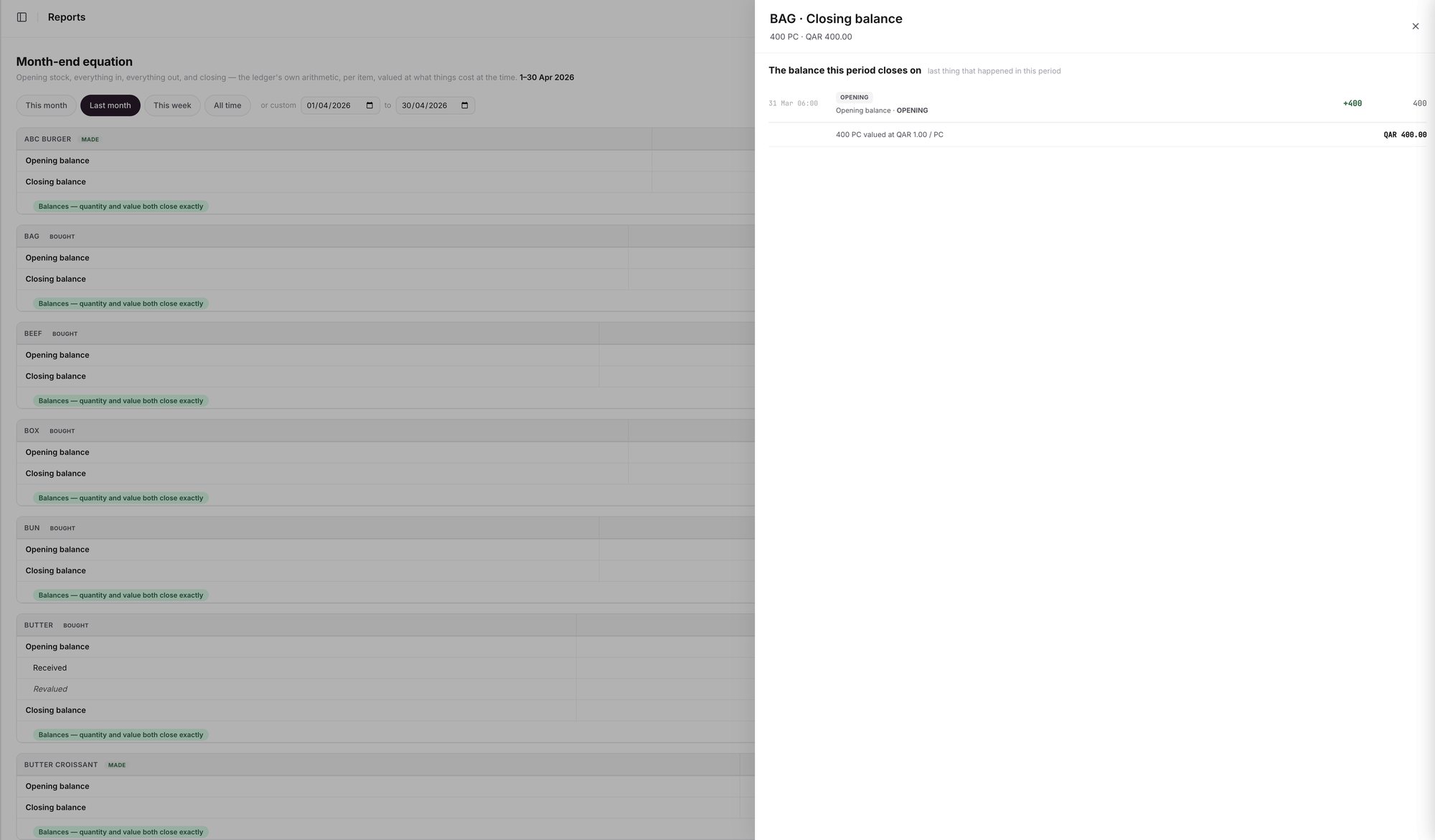
An example screen: the Month-end equation for a period, with one item's Closing balance drawer.
What does RATE DIFF mean?
RATE DIFF is the line for price changes. If what you pay for an item changes, the value of the stock you already hold changes with it. Wady Central shows that move on its own line, so a price change does not hide inside IN or OUT, and quantity and value both still balance. On an item's block the same line reads Revalued.
Count first, then read the report
The closing balance adds up the movements, and it matches the shelf only after a count. Open Count stock, count, review the variance and post before you read the month-end view. A count posts a dated adjustment for each item you counted and leaves the rest untouched. Logged waste appears as Wastage lines in the movements, and the Control page shows WASTAGE THIS PERIOD.
Nothing is locked, and your data stays yours
Nothing in Wady Central is locked. If you find a mistake after you reviewed a period, fix it with a new, dated line, and the history shows both. Your data is yours: you can export all of it, any day, free.
What does Wady Central not do?
It does not lock a month.
It does not post to your accounting software. It works alongside the accounting you already have.
It does not count the shelf for you. Until you count, the closing balance only adds up the movements.
The interface is in English.
Related guides
Frequently asked questions
Did this guide answer your question?
Didn't find your answer?
Message us on WhatsApp or by email, and our team will get back to you.
Your kitchen's stock, recipes and costing, with numbers from real records.
More guides in this topic
How do I run a stock count and review the variance?

