A daily kitchen report is a short morning page that says what changed since yesterday and what needs a decision today. Keep it to the few things that cost money if they wait: deliveries that did not arrive or were not confirmed, price changes, stock below its minimum, and batches nobody recorded. This guide shows what to put in it, why fewer findings beat a long report, and how the Daily Brief in Wady Central shows it as a screen you open each morning.
Key takeaways
A good daily report fits on one screen: yesterday's movements, what is waiting on someone, what changed in cost, and what is running low.
Put a money value and a document on every line, so nobody argues about the number.
Fewer findings beat a long list. If everything is flagged, nothing gets fixed.
In Wady Central the Daily Brief is a screen you open, not a message that is sent. Every figure is arithmetic on recorded movements, receipts and recipes.
What is a daily kitchen report, and who reads it?
A daily kitchen report is a one-page summary the kitchen reads at the start of the day. The chef or kitchen manager reads it before the first prep. The owner or cost controller reads it to see what needs a decision. It answers one question: what looks wrong or changed, while it is still cheap to fix? Skip the diary of everything that happened.
What should a daily kitchen report include?
Section | What it tells you | Example line |
|---|---|---|
Yesterday's movements | What came in, went out, was made and was thrown away | Received QAR 2,450, sent to outlets QAR 11,300, waste QAR 640 |
Supplier deliveries | Orders that were due and not received | Dairy order due yesterday, QAR 410, not received |
Deliveries to outlets | Sent and not confirmed | Two deliveries sent and not confirmed, QAR 3,900 |
Price changes | What costs more or less than last time | Butter up 8% on the last delivery, in 3 recipes |
Stock below minimum | What to order today | Five items below their minimum |
Batches not recorded | Cooking that happened but is missing from stock | Dough on the shelf, no run recorded |
The lines in this table are an example.
How do you write a daily kitchen report, step by step?
Pick the reader and the time. The report goes to the person who acts on it, and it is ready before the first prep.
Pull yesterday's records. Receipts, deliveries to outlets, production runs, waste entries and counts.
List only what needs action. A line earns its place when someone has to do something about it.
Put a value and a document on each line. "QAR 410 across 3 lines, order 1234" beats "dairy late".
Rank by value. The biggest money line goes first. Make it the one thing to know this morning.
Close the lines that are fixed. Do not carry yesterday's solved problem into today's page.
Say when nothing is wrong. A quiet day gets one line that says so.
Why do fewer findings beat a long report?
A long report trains people to skim. A report with a handful of lines, each with a value and a next step, gets read and acted on. Flag what costs money if it waits, and leave out what is only interesting. A number that cannot lead to an action today belongs in the monthly report.
How do you read the Daily Brief in Wady Central?
In Wady Central the daily report is the Daily Brief. It is a screen you open each morning. It reads your records, lists what looks wrong ranked by what it is worth, and shows what changed in cost, with the arithmetic behind each figure.
Open the Daily Brief
Click Daily Brief in the sidebar. The pill beside Refresh shows the date and time the figures are as at. Click Refresh to work them out again.
Read the banner THE ONE THING TO KNOW THIS MORNING. It holds the single finding most worth your attention, with a button that opens the screen that fixes it, such as Check the delivery.
Read the cards: THINGS TO CHECK, WHAT THEY ARE WORTH, RECIPES THAT MOVED COST, COST OF THE RISES, ON WHAT WAS RECEIVED and VALUE OF THE FALLS, ON WHAT WAS RECEIVED.
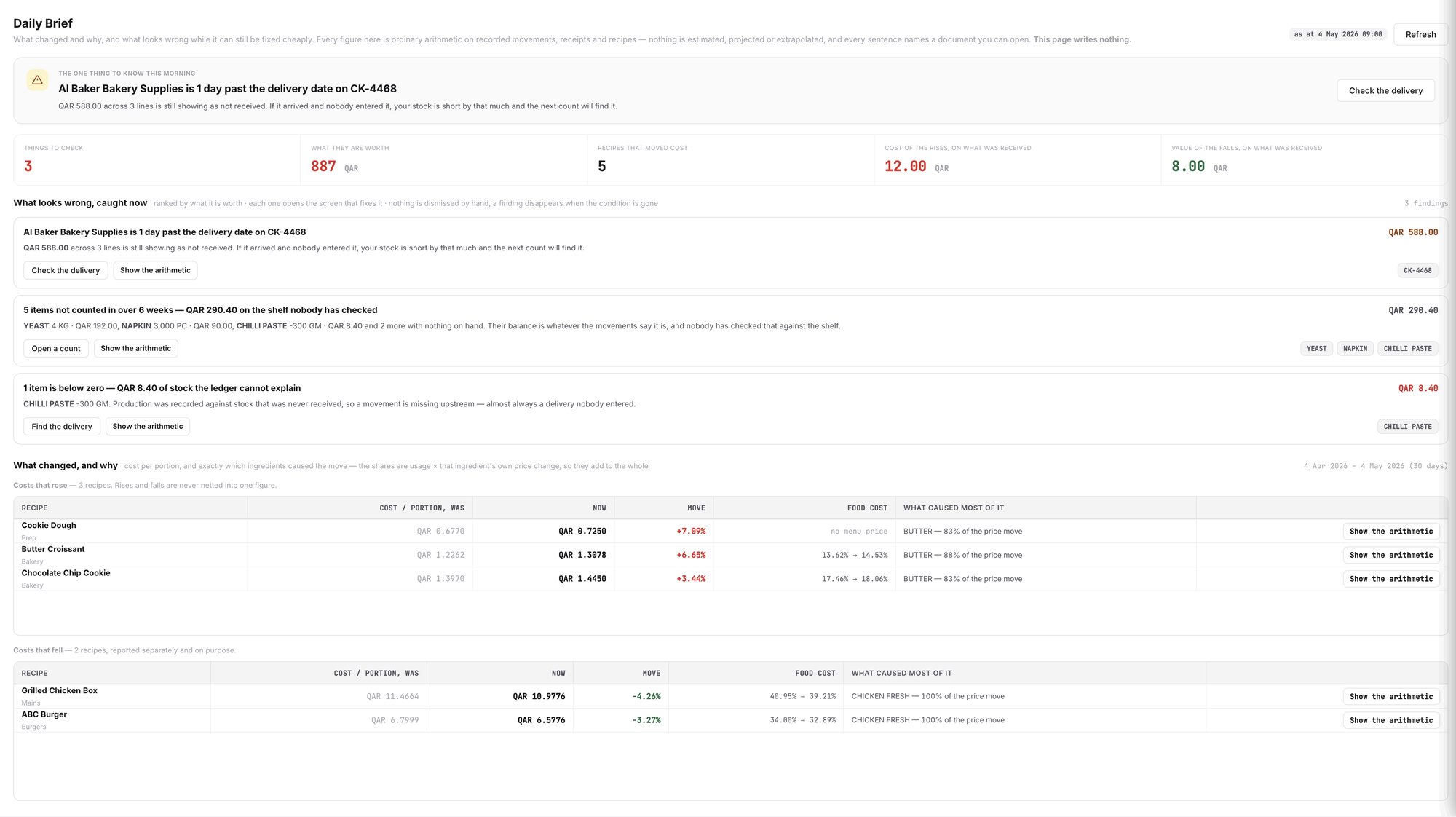
An example screen: the Daily Brief, with the one thing to know this morning, the findings and the cost tables.
Work through the findings
Under What looks wrong, caught now, each finding has a headline, a value in QAR and buttons. The findings are ranked by what they are worth. Each button opens the screen that fixes the problem, for example Check the delivery, Open a count or Find the delivery. Show the arithmetic shows how the figure was worked out.
A finding disappears when its condition is gone. Nobody dismisses it by hand. You can expect findings like these:
A supplier delivery that is past its delivery date and still shows as not received.
Items nobody has counted for a long time, with the value on the shelf.
An item below zero, often a delivery nobody entered.
Deliveries sent to outlets and still waiting for confirmation. This finding is named Deliveries Pending Confirmation, with the count in front. It opens the In transit tab on Dispatch.
See what changed in cost
Under What changed, and why, the tables Costs that rose and Costs that fell list the recipes whose cost per portion moved. Each row shows the cost per portion before and now, the move, the food cost before and after, and which ingredient caused most of it. Rises and falls stay in separate tables and are never netted into one figure.
ℹ️ Tip: Click Show the arithmetic on a row to see how it was worked out.
What does Wady Central not do?
It does not send the Daily Brief by message or email. You open it.
It does not estimate or predict. Every figure is arithmetic on recorded movements, receipts and recipes, and every sentence names a document you can open.
It cannot see what nobody recorded. A missing entry shows up through what it causes, such as an item below zero.
It does not write anything. The page only reads.
The interface is in English.
Related guides
Frequently asked questions
Did this guide answer your question?
Didn't find your answer?
Message us on WhatsApp or by email, and our team will get back to you.
Your kitchen's stock, recipes and costing, with numbers from real records.
More guides in this topic
Why does Wady Central question an unusual number?

