To track food waste, write down everything that goes in the bin at the moment it happens: the item, how much, why, and what it cost. Then read the log every week by reason and by item, and fix the biggest line first. This guide shows what a waste log should hold, which reasons to use, how to work out your waste percentage and cost, and how to record waste in Wady Central.
Key takeaways
Log waste when it happens, with a quantity, a reason and a cost. A guess at the end of the week is not a log.
A short, fixed list of reasons turns a pile of entries into answers.
Waste percentage is the cost of what you threw away divided by the cost of the food you used in the same period.
In Wady Central, a whole shift's waste goes in as one entry, each line is priced as you type it, and the cost lands in your stock records with its reason.
Why does food waste go unnoticed in a kitchen?
Food waste goes unnoticed because it leaves in small pieces. A tray of rice cooked too early. A crate of lettuce that turned. A sauce that burnt. Trim that went past the usual. None of it feels big enough to write down, so nobody does.
It shows up later, as a gap. The month-end count comes in below what your records expect, and food cost runs higher than your recipes say it should. Without a waste log, that gap has no name. It could be waste, a delivery nobody entered, or portions bigger than the recipe. A waste log answers the question before the count does. See how to run a stock count and review the variance.
How do you track food waste, step by step?
You track food waste by recording each discard at the station, in the same unit you use for stock, and reviewing the totals every week.
Put the log where the waste happens. A sheet at the pass or a screen in the kitchen. If people have to walk to an office, they won't log it.
Record every discard when it happens: the item, the quantity and unit, the reason, and who recorded it.
Weigh it instead of guessing. A kitchen scale turns "about a kilo" into 1.2 kg.
Use the same unit as your stock list. If you count chicken in grams, log chicken waste in grams, so it comes off the right balance.
Put a value on each line. Quantity times the current cost per unit. Kilos don't get attention. Money does.
Close the log at the end of each shift. One person checks that every line has a quantity and a reason.
Review it weekly. Sort by reason and by item, pick the biggest line, change one thing, and watch the next week.
What should each line of a waste log include?
Column | Example | Why it matters |
|---|---|---|
Date and shift | Tuesday, morning | Shows patterns by day and shift |
Item | Cooked rice | Tells you what to fix |
Quantity and unit | 2.5 kg | Same unit as stock, so balances stay right |
Reason | Overproduction | Sorts the log into answers |
Note | Event cancelled | Context the reason can't carry |
Value | 2.5 x cost per kg | Turns weight into money |
The values in this table are an example.
Which reasons should a waste log use?
Use five to eight fixed reasons, each pointing to a fix. A good reason tells you what to change. Keep "Other" small. If it grows, your list is missing a reason.
Reason | What it usually means | Where to look |
|---|---|---|
Spoiled or expired | Bought too early or stored badly | Order quantities, first in first out, fridge checks |
Overproduction | More was cooked than was used | The production plan against real orders |
Burnt or failed batch | The cooking went wrong | Training, equipment, the recipe method |
Dropped or spilled | A handling accident | Storage layout and containers |
Trim above normal | A delivery lost more than usual in prep | Supplier quality and cutting |
Returned by an outlet or a customer | A quality or order problem | Dispatch checks and recipe consistency |
Normal trim is not waste if your recipe cost already includes it. Log trim only when it goes beyond the usual. See how to cost a recipe with yield and trim loss.
How do you calculate food waste percentage and cost?
Add up the value of every line in the period. That is your waste cost. Divide it by the cost of the food you used in the same period, then multiply by 100.
Waste cost = the sum of (quantity wasted x cost per unit)
Food waste % = waste cost / cost of food used x 100
Cost of food used = opening stock + purchases - closing stock
Example: in one week a kitchen uses QAR 20,000 of food. Its waste log adds up to QAR 900. Waste is 900 / 20,000 x 100 = 4.5% of the food used. These numbers are an example, not a benchmark.
Watch the trend, not one week. A number that keeps rising for one reason tells you more than a single total. Some kitchens also track waste by weight (kg wasted / kg used) when prices move a lot. For the full food cost method, see how to calculate food cost.
How do you track food waste in Wady Central?
In Wady Central you record waste from the Stock page, one line per item, and each line takes its value from the item's current cost.
Record a shift's waste
Open Stock and click Record wastage. You can also click Wastage on an item's row.
Set Happened on. A shift's waste is often entered the next morning, so pick the day it happened.
Add one line for each thing that went in the bin: a raw ingredient, a batch you made, or a finished product. They all go on the same sheet. Press Enter to move to the next line, or click + Add line.
On each line, enter the Quantity in the item's unit and pick a Reason. Value lost fills in from the item's current cost.
Add a Note to a line, or one note for the whole entry, such as "fridge 2 was down overnight". You can attach a photo as proof for a disputed item.
Check the total at the bottom, then click Record wastage.
⚠️ Watch out: Ordinary trim is already priced into each recipe's cost. Use the reason Trim above normal only when a delivery lost more than that.
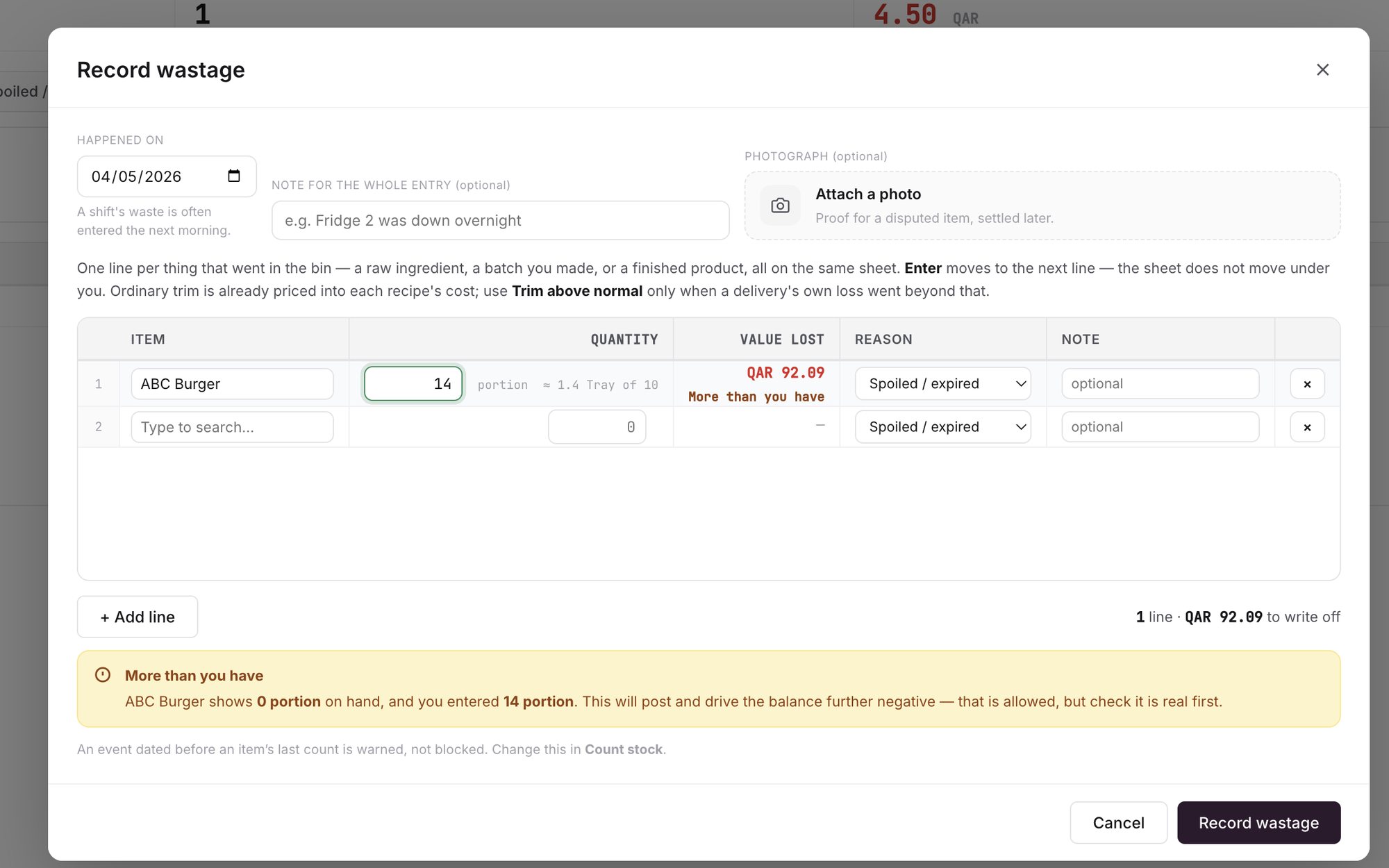
An example screen: one line per item, priced as you type.
What do the warnings mean?
More than you have: you entered more than the stock shows on hand. The entry still posts and the balance goes below zero, which is allowed, but check the quantity first. See why stock goes negative and how to fix it.
Dated before the last count: an entry dated before the item's last count gets a warning, not a block.
Where does the waste show up?
On the Wastage tab of the Stock page, and in the item's movement history with its reason. See stock movement history.
As waste cost by period, by reason and by item, so you can see what waste costs you and where it comes from.
ℹ️ Tip: If a line is wrong, reverse just that line. The original stays visible with the correction next to it, so the history stays honest.
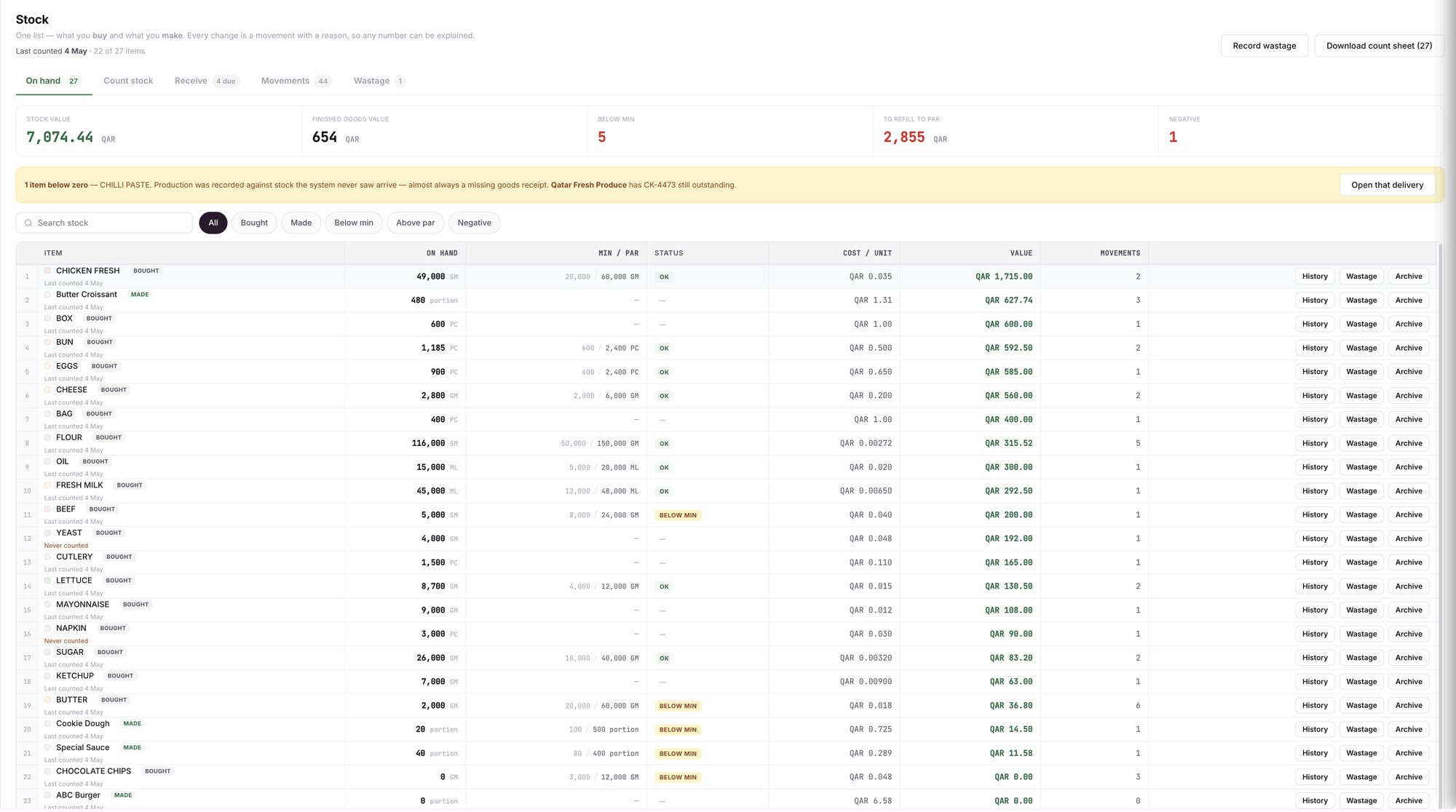
An example screen: the Stock page, with Record wastage at the top and the Wastage tab.
What does Wady Central not do?
It does not weigh food or spot waste by itself. Someone still records what went in the bin.
It does not connect to scales or barcode scanners.
The interface is in English.
Related guides
Frequently asked questions
Did this guide answer your question?
Didn't find your answer?
Message us on WhatsApp or by email, and our team will get back to you.
Your kitchen's stock, recipes and costing, with numbers from real records.

