A stock movement report, also called a stock ledger, lists every change to an item's quantity: when it happened, what it was, how much, the balance after it and the document behind it. If stock does not match the shelf, read the report from the last count forward until you reach the line that does not belong. This guide shows how to read a movement history, how to trace a gap, and how to do both in Wady Central.
Key takeaways
A stock movement report, or stock ledger, lists every change to an item with its date, quantity, balance and document.
You cannot check a change with no reason and no document, so the gap stays unexplained.
To trace a gap, start at the last count and check each later line against its document.
In Wady Central, every movement is a line with its reason and document, and the History button on an item shows them newest first.
What is a stock movement report?
A stock movement report is the list of every change to the quantity of an item: a delivery in, a batch out, waste, a count correction. Each line carries the date, the quantity, the balance after it and the value.
Column | Example | Why it matters |
|---|---|---|
Date and time | 4 May, 06:11 | Puts the line in order |
Type | Received, Wastage, Adjustment | Says what kind of change it was |
Quantity | +5 kg or -13.5 kg | Gives direction and size |
Balance after | 58 kg | Lets you check each line against the one before |
Reason and document | A delivery, with its receipt number | Gives the proof you can open |
The values in this table are an example.
Why does every stock change need a reason and a document?
You cannot check a number without a reason. If butter falls by 9 kg, you need to know whether it went into a batch, into the bin or out of the door, and which paper says so.
A reason sorts the gap: a missing delivery, production above the recipe, waste or a count error.
A document lets you check the line against the real world: the delivery note, the production record or the count sheet.
Together they let you correct a mistake with a new line instead of rewriting history.
⚠️ Watch out: An adjustment with no document deserves a close look. It says the balance was wrong, not why.
How do you read a stock movement history?
Pick one item. A view of all items at once hides the pattern.
Start at the last count, or at the opening balance if the item was never counted, and read forward by date.
Check the balance on each line. The previous balance plus the quantity must equal the new balance. A jump with no line is a missing record.
Group the lines by type (in, out, adjusted) and compare the totals with what you expect. Ingredient lines should match the recipes of what the kitchen made.
How do you trace a gap between your records and the shelf?
Tracing a gap means finding the first line where the records and the shelf stopped agreeing.
Write the gap down: the item, the quantity in the system, the quantity on the shelf and the difference.
Find the last time the two agreed: a count or the opening balance.
List every line since then and check each against its document. A delivery note that says 5 kg beside a line that says 50 kg is a typing slip.
Look for what is missing, not only what is wrong: a delivery with no line, production with no receipt, waste nobody logged.
Fix the cause with a new, dated line. Never overwrite the balance.
Example: the system says 12 kg of cream is on hand, and the shelf holds 7 kg. The last count, on 1 May, found 14 kg. The lines since then:
Date | Type | Quantity | Balance |
|---|---|---|---|
1 May | Count | 14 kg | 14 kg |
3 May | Received | +10 kg | 24 kg |
5 May | Production out | -9 kg | 15 kg |
6 May | Production out | -3 kg | 12 kg |
The lines add up to 12 kg, so the record is right on its own terms, and 5 kg left without a line. The kitchen log shows a fridge failed overnight on 4 May and the team threw the cream out. The fix is a waste entry for 5 kg dated 4 May.
How do you see stock movement history in Wady Central?
In Wady Central, every movement is a line with its reason and its document, dated and permanent. Nothing moves stock without a line. See the stock feature.
What is on each line
The Movements tab lists the movements of all items, with the columns When, Item, Movement, Quantity, Balance, Value, Reason and Document. The History button on an item shows the same lines in five columns: WHEN, WHAT HAPPENED, QTY, BALANCE and VALUE.
Type | What it records |
|---|---|
Opening | The starting balance |
Received | A delivery, with supplier and receipt number |
Production Out | An ingredient used by a production entry |
Production In | Finished portions from a production entry |
Wastage | A waste entry |
Outlet Order | Stock sent out for an outlet's order |
Stock Count | The adjustment a count posts |
Adjustment | A correction to the balance |
The bold reference at the end of each WHAT HAPPENED cell is the document, and its prefix gives the type: `GRN-` goods receipt, `PROD-` production entry, `DN-` delivery note, `WST-` wastage entry and `CNT-` count.
Open an item's history
Open Stock in the sidebar and find the item with Search stock, or use a chip such as Negative or Below min.
Click History on its row. A drawer opens with the heading "Everything that moved this item" and the note "newest first".
Read the summary line under the item name: quantity on hand, its value, its number of movements and its last count date.
Read the lines from the top. Quantities carry a sign, plus in green and minus in red, and the top BALANCE is what is on hand now.
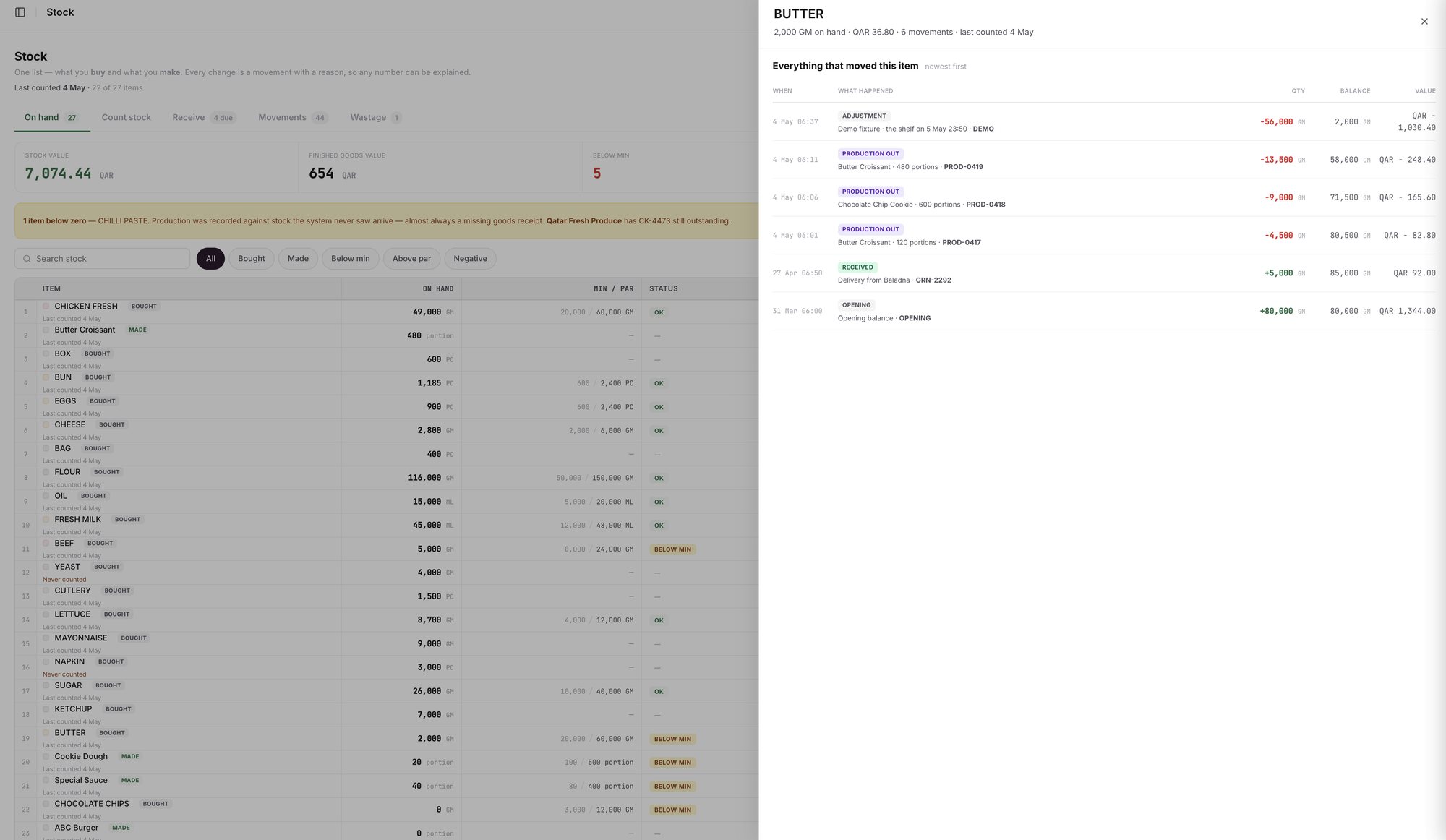
An example screen: the History drawer of one item, newest line first.

An example screen: a bought item's history with its supplier and receipt number.
Trace a gap in Wady Central
Open the item's History and compare the top BALANCE with your count.
Read down to the last count, whose date is in the summary line.
Check each reference: a PRODUCTION OUT line should match the production entry that used the item, and a RECEIVED line should match the delivery note.
Look for what is missing. For an item below zero, the yellow banner on the Stock page points to a likely missing goods receipt. See why stock goes negative and how to fix it.
Fix the cause with a new line: record the delivery, record the waste on the day it happened, or count the item again. See how to track food waste and how to run a stock count and review the variance.
What does Wady Central not do?
It does not let you overwrite or delete a past line. Nothing is locked or deleted: you fix a mistake with a new, dated correction, and the original stays visible next to it.
It does not read your POS yet, so movements come from what your team records: deliveries, production, waste, counts and outlet orders.
It does not work out the cause of a gap for you, except for a negative balance, where it points to a likely missing receipt.
The interface is in English.
Related guides
Frequently asked questions
Did this guide answer your question?
Didn't find your answer?
Message us on WhatsApp or by email, and our team will get back to you.
Your kitchen's stock, recipes and costing, with numbers from real records.
More guides in this topic
How do I read the Stock page?
Why is my stock negative, and how do I fix it?

