Negative inventory, or negative stock, means your records show more leaving than ever came in. The food was there, but the record of it arriving, or of what was on the shelf at the start, was not. Find the missing record and add it as its own dated document, a receipt or a count, and leave the balance itself alone. This guide covers the usual causes, how to find yours, and how Wady Central flags a negative balance and points to the likely fix.
Key takeaways
A negative balance means the records show more going out than coming in. It is a clue to a missing record.
The usual causes are a delivery not entered, production recorded before receiving, opening stock never counted, and waste entered twice or after its count.
Overwriting the balance erases the evidence. Add the missing record with its date instead.
Wady Central allows negative stock, flags it on the Stock page and the Control page, and points to the likely missing goods receipt.
Why does stock go below zero?
Stock goes below zero when more is recorded out than was ever recorded in.
Cause | What happened | Where to look |
|---|---|---|
Delivery not entered | The supplier delivered, the receipt was not recorded, and production used the goods | Delivery notes and open orders |
Production recorded before receiving | The batch was entered today and the receipt is entered tomorrow | The dates of the production and the receipt |
Opening stock never counted | The system started at zero for items already on the shelf | The opening balance and the first count |
Waste entered twice or after its count | A count already took the loss off, then the waste went in with an earlier date | The count date and the waste date |
A unit slip | 300 g typed as 300 kg, or a pack received at the wrong size | The quantity against the document |
Waste that goes unlogged does the opposite: it leaves the balance too high until the next count.
How do you find the cause of a negative balance?
Open the item's movement history. See stock movement history.
Find the line where the balance crossed zero. It is often a batch, a delivery out or a waste entry that used stock the system never saw arrive.
Look for the missing "in". Check open purchase orders and delivery notes for the item. A delivery that arrived and was not received is the most common find.
Check the dates. A receipt entered after the production that used it explains a temporary negative.
Check the opening balance. An item that was on the shelf at the start and never counted explains a permanent one.
Check the size of the number. A balance wrong by a factor of 10, 100 or 1,000 points to a unit slip.
Example: tomato paste starts at 0 g because it never got a first count. A 6 kg delivery arrived last week and the receipt never went in. A batch then uses 600 g, so the balance shows -600 g. Entering the receipt adds 6,000 g, and the balance becomes 5,400 g.
Why should you not overwrite the balance?
Typing a new balance over a negative number makes the red figure disappear, and the cause with it.
The evidence goes. The negative balance points to a missing record, and overwriting it hides which one.
The cost stays wrong. A delivery that was never entered is a purchase missing from your records, so the month's numbers are off.
It comes back. The process that produced the gap is still running.
You lose the audit trail. A balance with no document behind it gives you nothing to check later.
ℹ️ Tip: Add the missing record with its own date instead: the receipt, or a count. Both leave a line in the history that explains the change.
How do you handle negative stock in Wady Central?
Wady Central allows a balance below zero and flags it, never hides it. This is part of the stock feature: a negative balance is a clue, most often a delivery that was not entered.
Spot it
The banner. When an item drops below zero, a yellow banner appears above the list on the Stock page. It names the item, says production was recorded against stock the system never saw arrive, calls it almost always a missing goods receipt, and names the supplier order still outstanding. Its Open that delivery button opens that delivery.
The card and the chip. The NEGATIVE card counts the items below zero, and the Negative chip filters the list to them.
The Control page. The Balances below zero section lists each item with its BALANCE, VALUE and LIKELY CAUSE, and the ITEMS BELOW ZERO card shows the count and the value together. The page only reads: you cannot change anything on it. See control and reports.
The Daily Brief. An item below zero appears as a finding with a Find the delivery button, and the finding goes away once you fix the cause.
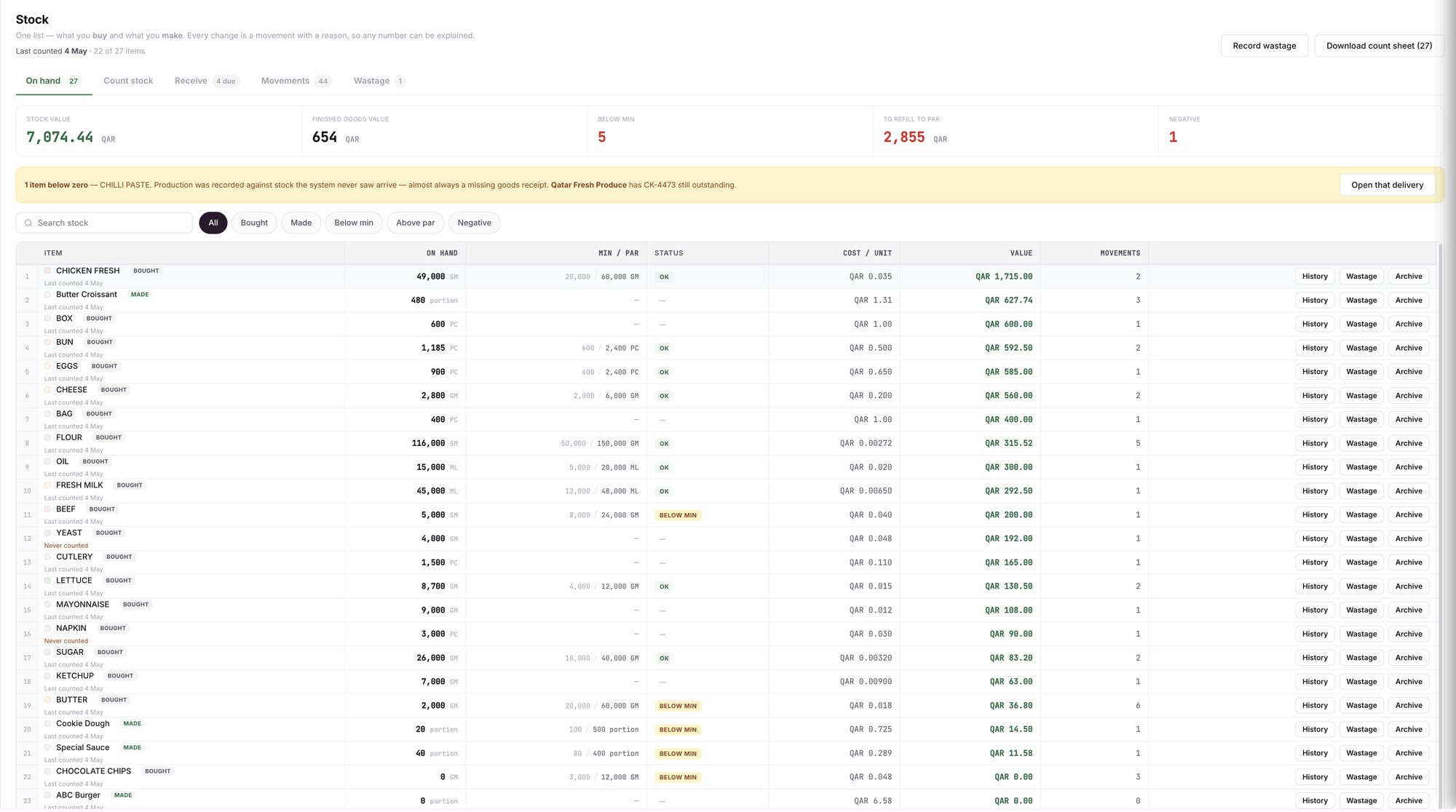
An example screen: the Stock page with the below-zero banner, the Negative chip and the NEGATIVE card.
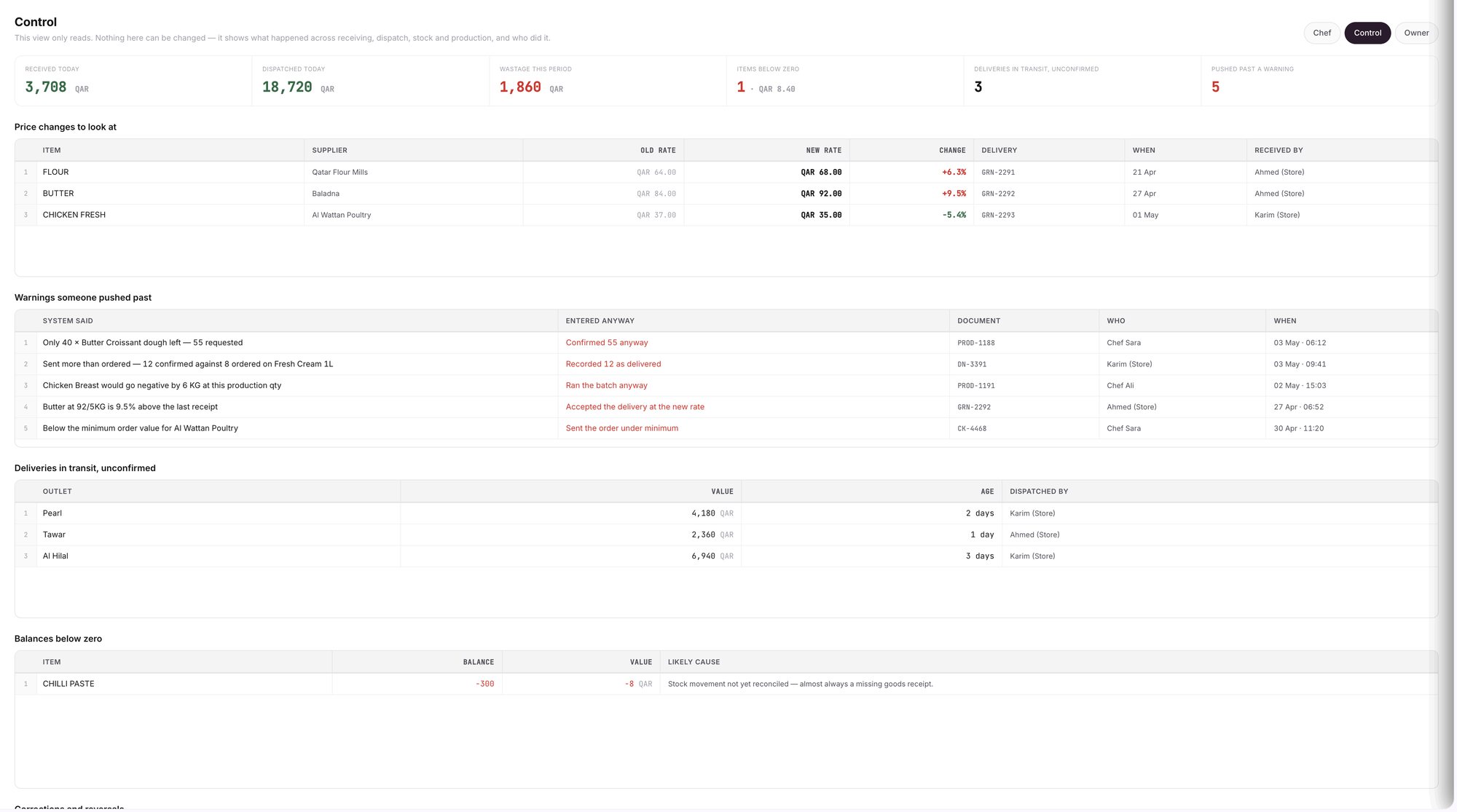
An example screen: the Control page, with Balances below zero at the bottom.
Fix it
Click Open that delivery in the banner to open the delivery still outstanding.
Check what arrived against what was ordered. Click All arrived as ordered if it matches, or change the received quantities, then click Post receipt. The receipt adds a RECEIVED line to the item's history with its own `GRN-` number. See how to receive a supplier delivery.
If the delivery did not come through Wady, use Receive without an order on the Receive tab. See recording a delivery with no purchase order.
If no delivery is missing, count the item. Open Count stock, enter what is on the shelf, review the variance and post. A count moves only the items you counted and leaves the rest untouched, including any item below zero. See how to run a stock count and review the variance.
For an item you make, record the production run that made it. A made item can also go below zero, and recording the run clears the balance.
Check the result. Once the balance is at zero or above, the item leaves the Negative filter and its Daily Brief finding goes away on its own.
What do the warnings mean?
More than you have in Record wastage: you entered more than the stock shows. The entry still posts and the balance goes further negative, which is allowed, so check the quantity first.
STOCK AFTER in Record production: an ingredient row turns red when the run would take it below zero. You can still record the run, so check that its delivery was received.
A waste entry dated before the item's last count shows a warning, not a block. The count already took that loss off.
What does Wady Central not do?
It does not block an entry that takes stock below zero. It warns you and records the balance.
It does not fix the cause for you. It points to the likely missing receipt, and you enter the receipt or count the item.
It does not change a past line to clear a negative balance. Nothing is locked or deleted, so the fix is a new, dated line.
The interface is in English.
Related guides
Frequently asked questions
Did this guide answer your question?
Didn't find your answer?
Message us on WhatsApp or by email, and our team will get back to you.
Your kitchen's stock, recipes and costing, with numbers from real records.

