
Restaurants manage inventory across branches by keeping one item list for the whole group, recording every stock movement against it, and counting stock on a fixed schedule. Each outlet and the central kitchen receive, use, waste and transfer stock on that same list, so the group works from one set of numbers. The month closes when opening stock, plus what came in, minus what went out, matches what you count.
If you run more than one site in Qatar, this page shows how stock moves between a central kitchen and its outlets, and where Excel breaks.
Key takeaways
Keep one item list for the whole group and record every stock movement against it.
Five things change a balance: receiving, use, transfers, waste and counts.
Outlets confirm what arrived, so stock in transit stays visible.
Excel works for one outlet with one file owner; across outlets, orders get retyped and one wrong digit can run for a month.
What is restaurant inventory management?
Restaurant inventory management is the record of what you hold, what comes in, what goes out and what it is worth. With several outlets, each item also needs a location. Five things change a stock balance:
Receiving. Goods arrive from a supplier.
Use. Ingredients go into a recipe or a production run.
Transfers. Stock leaves the central kitchen for an outlet.
Waste. Stock spoils, gets dropped or expires.
Counts. A physical count corrects the balance.
A movement without a line in the records is a gap in your numbers. The arithmetic is in how to calculate food cost.
How do stock counts work?
A stock count compares what the records say you hold with what sits on the shelf. Count in the units your team handles, such as sacks, cases, litres and grams. Record a blank as not counted and 0 as none, because they mean different things. Review the largest differences first, and check for typing errors before you assume a loss. WRAP, a UK food waste charity, publishes guidance on measuring and reporting food waste in hospitality and food service that helps businesses see where savings are. To count properly, follow the restaurant stock count steps.

How do restaurants track waste?
Waste belongs in the records as its own movement: the item, the amount, the reason and the cost. A reason such as spoiled, over-prepared or dropped turns a loss into something you can act on. The UN reports that 1.05 billion tonnes of food, about 19 percent of what was available, was wasted worldwide in 2022 (UN Sustainable Development Goal 12). In Qatar, the Ministry of Municipality and Qatar University signed an agreement to study agricultural loss and food waste in support of the National Food Security Strategy 2030.
How does stock move between a central kitchen and its outlets?
Outlets place orders with the central kitchen. The kitchen picks and dispatches them on a delivery run, and each outlet confirms what arrived. Until it confirms, the goods are in transit. Without that step, the kitchen's records say the stock left, the outlet's records say it never came, and nobody can say where it is. Shortages and returns need their own lines, with their value. See what a central kitchen is if you cook for several outlets.
Why do Excel sheets break across branches?
Excel works for one outlet with one person who owns the file. Across outlets, operators in Qatar describe four problems.
The same order is typed three times. Outlets send orders on paper, WhatsApp or Excel. The kitchen rewrites them into one sheet, retypes them as transfers, and control checks them again.
One wrong digit runs for a month. Millilitres against litres, a comma where a decimal point belongs, 336 typed as 0.336. Nothing questions the entry, and every report after it is quietly wrong.
Transfers stay open. The outlet never closes the transfer, so the balance in the sheet is a guess.
Recipe and reality drift apart. The recipe says 100 grams, the cook used 200, and the monthly count never matches the system.
Wady's view of all four: "This is not a people problem. The work gets recorded in pieces, so no number can be traced back."
Excel or inventory software?
Excel sheets | Inventory software to look for | |
|---|---|---|
Item list | A copy per outlet, each slightly different | One item list shared by every outlet |
Transfers | Retyped at the kitchen and again at the outlet | Outlets confirm arrival, so stock in transit shows |
Typing errors | Nothing questions them | Odd numbers get questioned at entry |
Counts | Blank and zero look the same | A blank means not counted, 0 means none |
Month-end | Days spent finding why opening plus in minus out does not equal closing | Balance per item, differences visible by item |
Best for | One outlet, one owner of the file | Several outlets and a central kitchen |
How Wady Central helps with restaurant inventory management
Wady Central is Wady's paid product for multi-branch groups and central kitchens, built in Qatar. One account holds every brand, branch and kitchen, and it suits one café up to a large group.
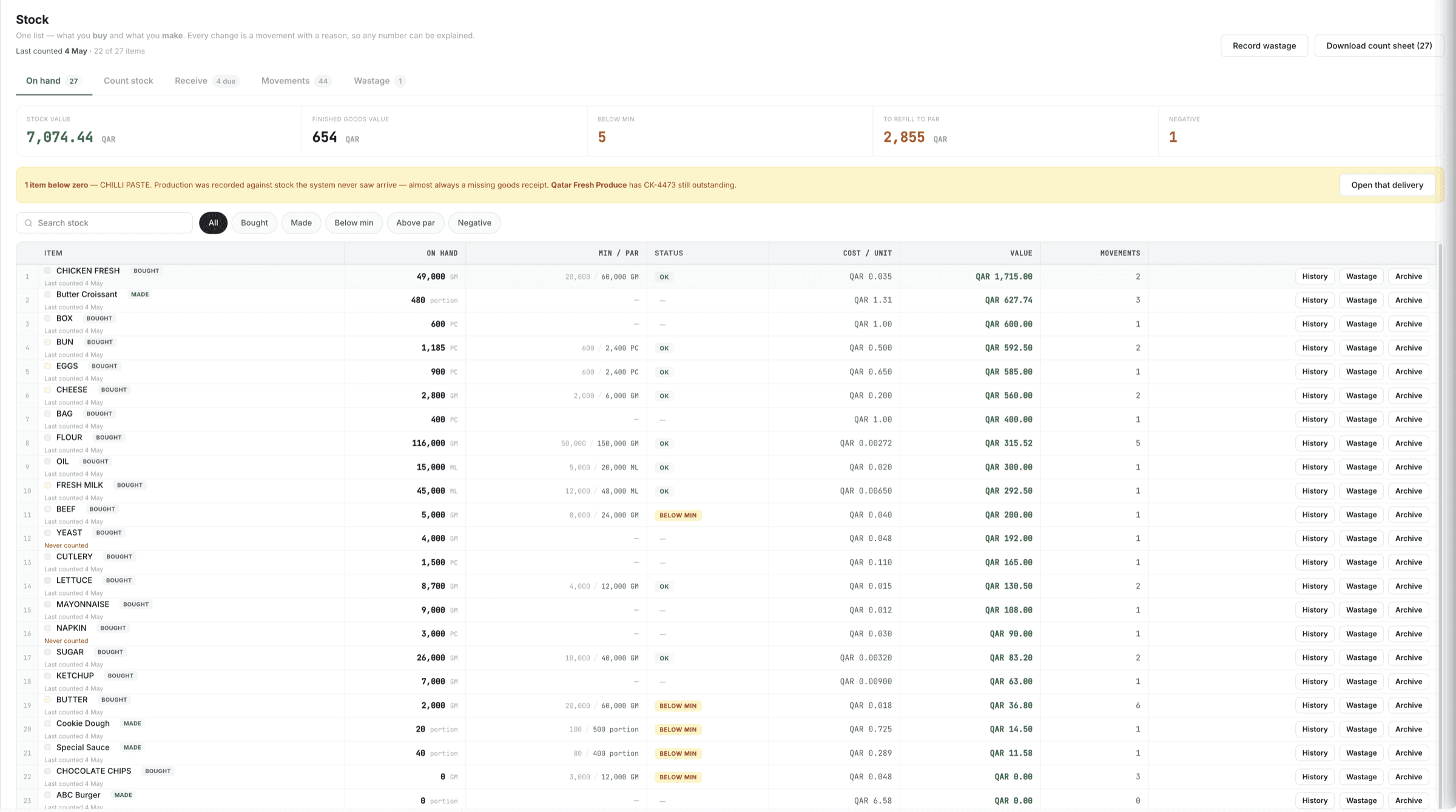
Stock. Ingredients and finished products sit on one list. Every movement lands there with its reason and a dated document, and each balance opens to its full history. Low-stock alerts show the cost to refill, and negative balances are flagged, never hidden. Receiving means confirming, not typing, whether the supplier is on Wady or not.
Counts and waste. You count on paper or on screen, in sacks and grams. Blank means not counted, and only 0 means none. You review differences with likely typos first. A shift's waste goes in as one entry with your own reasons, and waste cost shows by period, reason and item.
Dispatch. Delivery runs come with pre-filled picking lists and a signable delivery note. Outlets confirm arrival in the same app. An in-transit list shows value and age, and shortages and returns are recorded with their value.
Month-end balances per item. Wady Central works alongside the POS and accounting you already have, and you can export all your data any day, free. Over 100 businesses in Qatar already use Wady, including Crave Holdings and OMC. See the pricing page for the plans.
See it on your own outlets: start with the Wady Central overview. A walkthrough takes 20 minutes.
Frequently asked questions
Your kitchen's stock, recipes and costing, with numbers from real records.


