The Stock page in Wady Central is one list of everything you buy and everything you make, with the quantity, cost per unit and value of each item. Five cards sit above the list, and each row opens to that item's full history. This guide covers the tabs, cards, filters, columns, statuses and last count dates.
Key takeaways
One list holds items you buy (BOUGHT) and items you make (MADE), each with quantity, cost per unit and value.
Five cards sit above it: stock value, finished goods value, below min, to refill to par and negative.
Chips filter the list to bought, made, below min, above par or negative items.
Each row shows its last count date, or Never counted, and opens its history.
What is the Stock page for?
The Stock page shows what is on your shelves and what it is worth. Each change on it is a movement with a reason, so you can trace any number through its stock movement history. It is the main screen of the stock feature.
How do you read the Stock page in Wady Central?
Start with the tabs
Open Stock in the sidebar. Five tabs run across the top, and most carry a live number.
On hand: the list this guide explains.
Count stock: count the shelf and review the variance before anything posts. See how to run a stock count and review the variance.
Receive: check in deliveries.
Movements: the movements of all items together.
Wastage: the waste entries, with Record wastage at the top right.
Read the five cards
Card | What it shows |
|---|---|
STOCK VALUE | What your stock is worth, in QAR |
FINISHED GOODS VALUE | The value of the products you make, in QAR |
BELOW MIN | How many items are under their minimum |
TO REFILL TO PAR | The cost, in QAR, of refilling to par |
NEGATIVE | How many items are below zero |
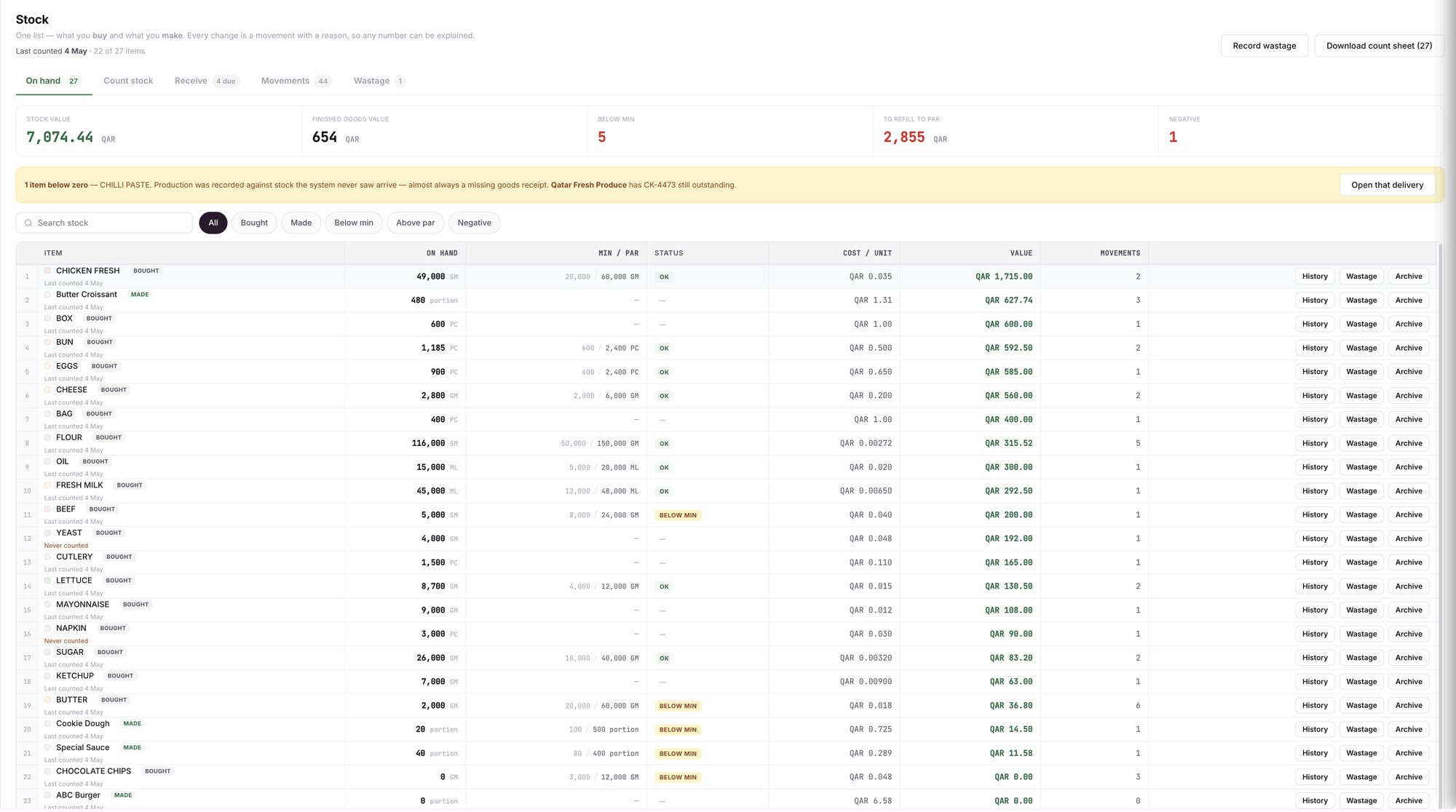
An example screen: the Stock page and its five cards.
Filter the list
Type in Search stock, or use the chips: All, Bought, Made, Below min, Above par and Negative.
ℹ️ Tip: The number in the Download count sheet label follows the filter, so on Below min you download a sheet for only those items.
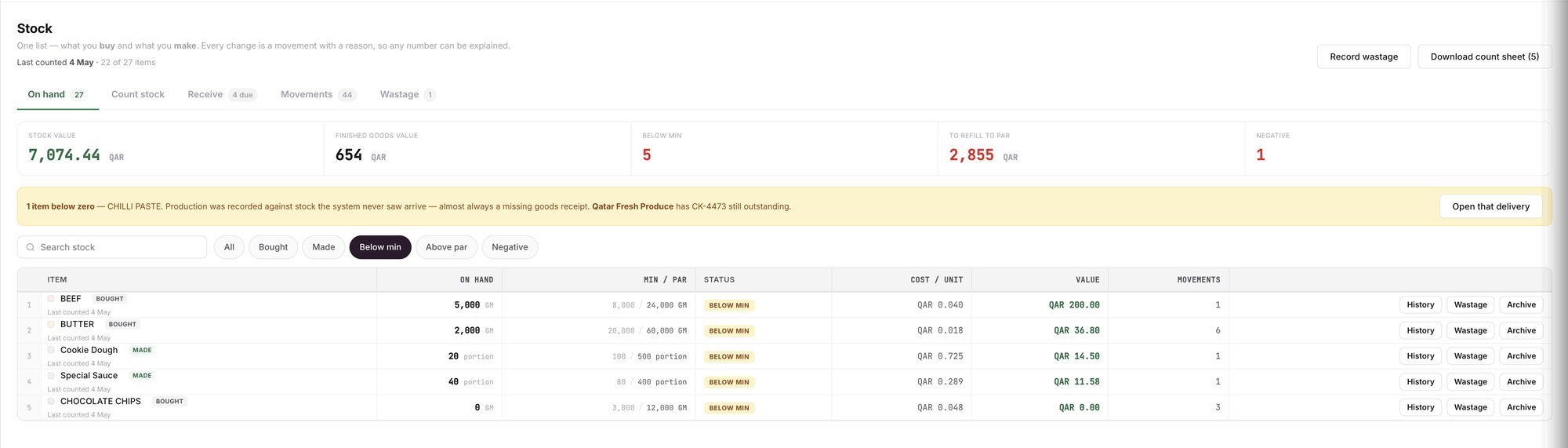
An example screen: the Below min filter and the count sheet button.
Read a row
Column | What it shows |
|---|---|
ITEM | The name, a BOUGHT or MADE badge, and its last count |
ON HAND | The quantity and its unit (GM, ML, PC or portion) |
MIN / PAR | Minimum and par levels, minimum first. A dash means none |
STATUS | OK or BELOW MIN. A dash means no levels |
COST / UNIT and VALUE | The current cost of one unit, and what the quantity on hand is worth, in QAR |
MOVEMENTS | How many movements the item has |
An item under its minimum shows BELOW MIN and counts in the BELOW MIN card. Each row ends with History, Wastage and Archive buttons.
See when an item was last counted
Each item carries a small line: Last counted with a date, or Never counted in red. Under the page title, a line such as "Last counted 4 May · 22 of 27 items" gives the date of the last count and how many of your items have a count behind them.
ℹ️ Tip: Count never-counted items first. See how to do a stock count in a restaurant.
Open an item or follow the banner
History opens an item's movements, newest first.
Wastage records waste for that item. See how to track food waste.
A yellow banner appears when an item drops below zero. It names the item, points to a likely missing goods receipt and offers Open that delivery. See why stock goes negative and how to fix it.
Related guides
Frequently asked questions
Did this guide answer your question?
Didn't find your answer?
Message us on WhatsApp or by email, and our team will get back to you.
Your kitchen's stock, recipes and costing, with numbers from real records.
More guides in this topic
How do I trace any item's stock movements?
Why is my stock negative, and how do I fix it?

