Why Wady Central Double-Checks an Unusual Number Before You Post It
By Asaad Al Hashmi, Founder and CEO of Wady
Wady Central questions a number that looks wrong while you are still typing it, so you catch a slip before it runs through your stock and costs. It never blocks you: read the warning, check the number against the paper and post it if it is right. This guide shows the checks you can see on screen and what to do when one appears.
Key takeaways
A wrong number caught while you type takes one edit to fix, and one left alone makes every report after it wrong.
Warnings never block. You check the number, then post.
On screen you will see a Price alert on delivery prices, More than you have on wastage and a warning for entries dated before an item's last count.
Control lists the warnings someone went ahead with, under Warnings someone pushed past.
Why does Wady Central question some numbers?
One wrong digit can run for a month. For example, a quantity of 336 typed as 0.336 goes through unquestioned, and every report after it is wrong. Wady Central questions an odd number while you type it, with the person who knows the real number still there. It stays quiet on normal work and does not block.
How do you respond when Wady Central questions a number?
Read the sentence. It says in plain words what looks off.
Check the number against the source: the delivery note, the scale or the count sheet.
Correct it, or post it. If it was a slip, fix it. If the number is real, post it.
Which checks can you see?
A price more than three times the item's current cost. An amber Price alert appears as you enter a delivery. It gives the effective rate and how far above the active cost it is, and ends with "You can still post the receipt." See how to receive a supplier delivery.
More than you have. On a wastage sheet, if you enter more than the stock shows on hand, a yellow banner More than you have says what is on hand and what you entered. It says the entry will post and take the balance further below zero. That is allowed, so check the number is real first. See how to track food waste.
An entry dated before the last count. The entry gets a warning and you can still post it. The screen says you can change this in Count stock, where the Refuse back-dated events checkbox sits.
A count far from the book. In a count review, a line far from what the book shows gets a Check the count unit badge under Worth a second look. Wady Central blocks nothing there. See how to run a stock count and review the variance.
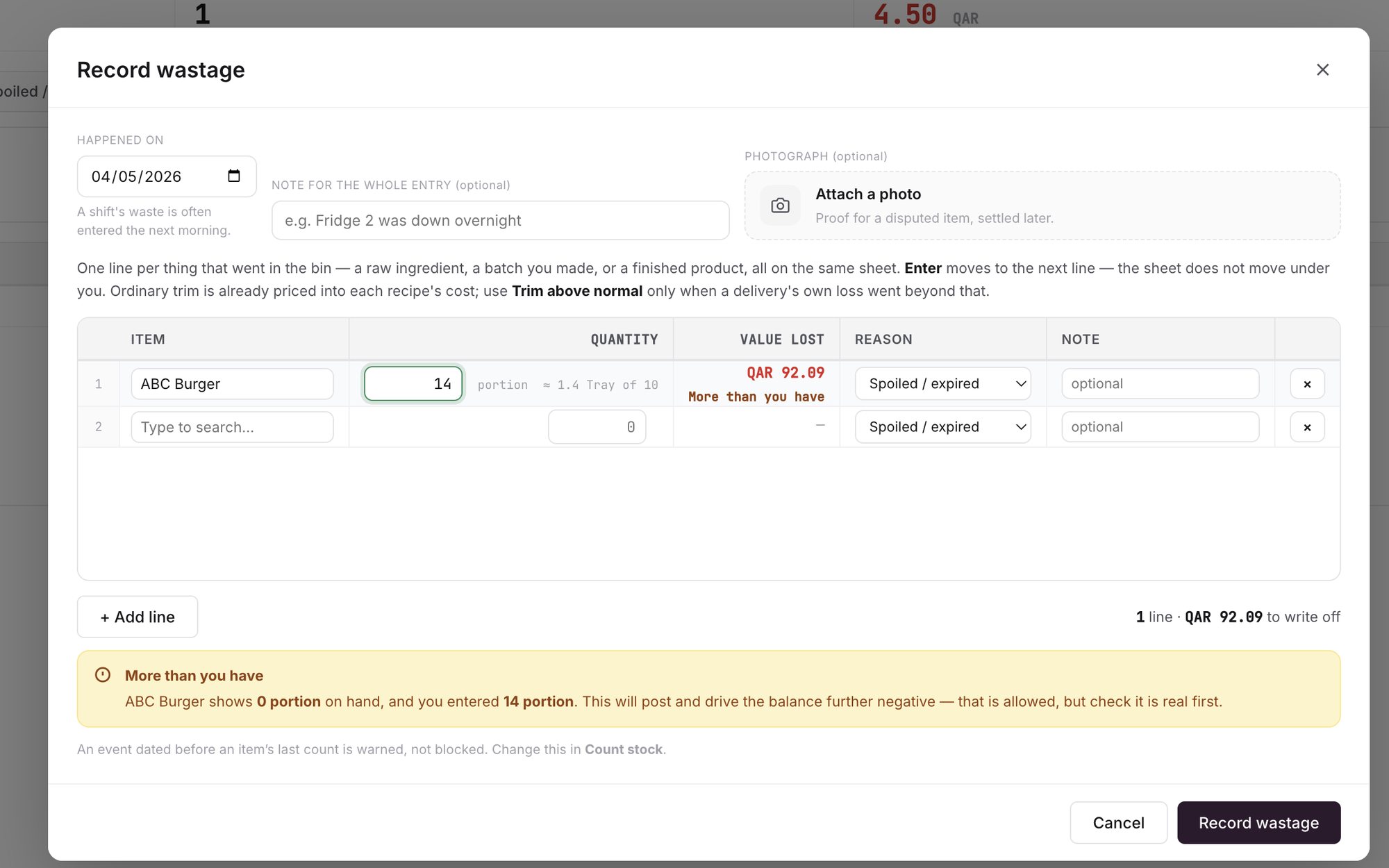
An example screen: the Record wastage sheet, with the More than you have banner and the note about back-dated entries.
Where does a warning you went ahead with show up?
The Control page has a section called Warnings someone pushed past. For each one it lists what the system said, what the person entered anyway, the document, who did it and when. The page only reads, so you cannot change anything on it.
Related guides
Frequently asked questions
Did this guide answer your question?
Didn't find your answer?
Message us on WhatsApp or by email, and our team will get back to you.
Your kitchen's stock, recipes and costing, with numbers from real records.
More guides in this topic
What does the Daily Brief show me?

