Wady Central shows the food cost percentage and the margin of each dish at its menu price, next to its cost per portion. Type a menu price on a recipe and both appear at once. If an ingredient's price moves, the recipe cost and the food cost follow. This guide covers where to find both, how to set a menu price, and what changes when a price moves.
Key takeaways
Food cost % is the cost of one portion divided by the menu price. Margin is what is left of the price after that cost.
Type a menu price on a recipe to see both. A recipe with no menu price shows a dash.
Dishes over the food cost limit show in red, and a card counts them.
If an ingredient's price moves, the recipe cost and food cost are recalculated, and the Daily Brief lists the recipes that moved.
What do food cost % and margin tell you about a dish?
Food cost % shows how much of the menu price goes on the cost of one portion. Margin shows what is left per portion.
Food cost % = cost per portion / menu price x 100
Margin = menu price - cost per portion
Example: a dish costs QAR 6.50 per portion and sells for QAR 20.00. Food cost is 6.50 / 20.00 x 100 = 32.5%, and the margin is QAR 13.50. To choose a price from a target food cost, see menu pricing from food cost and how to calculate food cost.
How do you see food cost and margin for each dish in Wady Central?
Both live in the recipes and costing feature, on the Recipes page.
See every dish at once
Open Recipes in the sidebar. The list shows each recipe with PORTIONS, LINES, COST / PORTION, MENU PRICE and FOOD COST.
The cards above the list show AVG FOOD COST and, in a card labelled with the limit, how many recipes sit over it.
Check the FOOD COST column. Dishes over the limit show in red and the others in green. A recipe with no menu price shows a dash in MENU PRICE and FOOD COST.
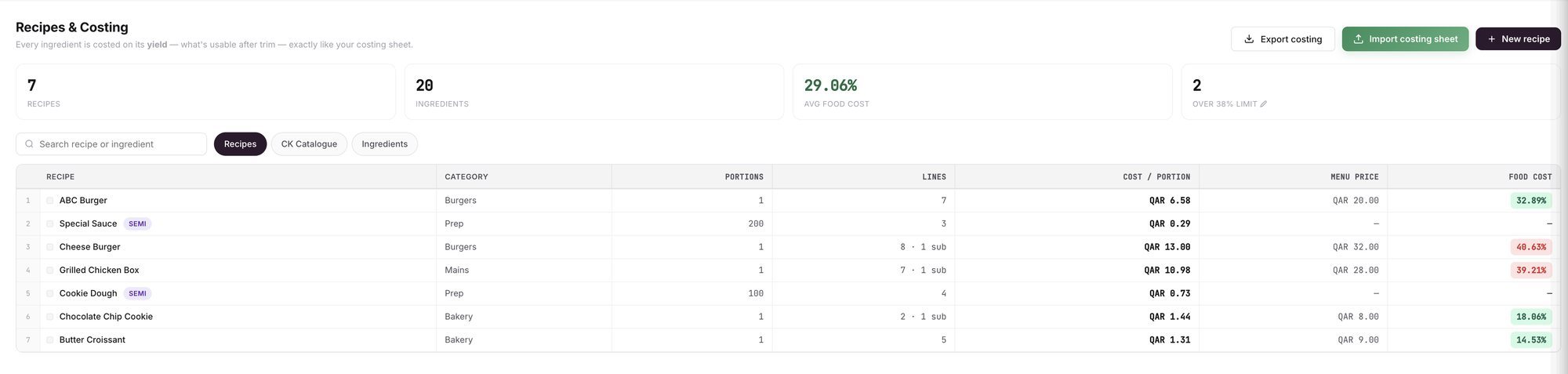
An example screen: each recipe with its cost per portion, menu price and food cost.
Set or change a menu price
Click the recipe in the list, then click Edit. The Edit recipe drawer opens.
Under MENU PRICE, type the price in Menu price. The food cost % and the margin appear beside the field.
Click Save recipe.
ℹ️ Tip: In a recipe's detail, PRICE SUGGESTION lists five other menu prices with the food cost and margin of each, so you can see where a price would land before you change it.
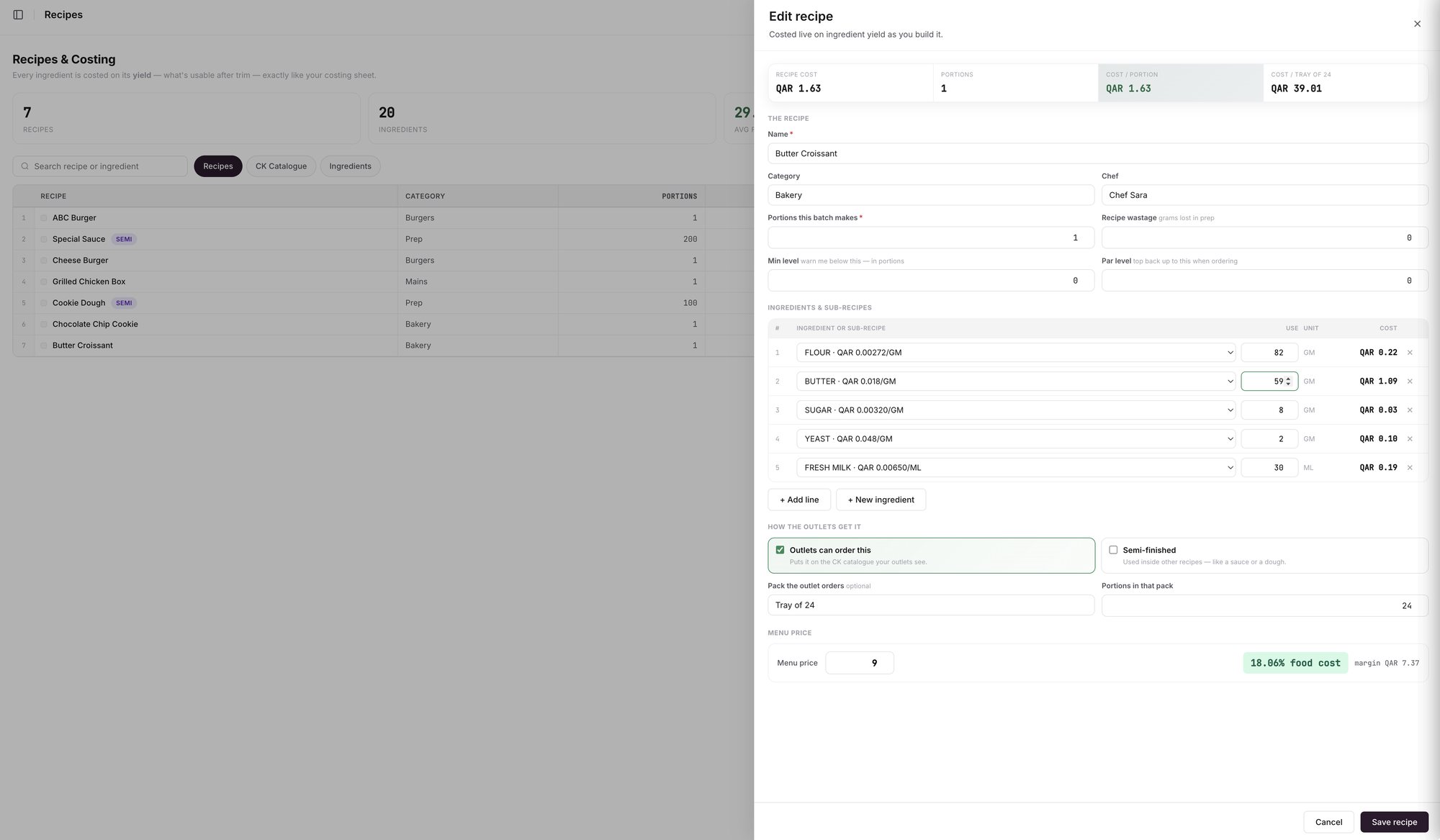
An example screen: the Edit recipe drawer, with menu price, food cost % and margin.
What changes when a price or a cost changes
You change the menu price. Food cost % and margin change at once. The cost per portion stays the same.
You change a quantity in the recipe. The cost per portion changes, and the food cost % follows.
An ingredient's price moves. A recipe's cost comes from its ingredients, so Wady Central recalculates it every time one of them changes price. On the receiving screen, a banner names the recipes a delivery changes and shows the new cost.
After the delivery. The Daily Brief lists the recipes whose cost moved, with their food cost before and after and the ingredient that caused most of the move. Rises and falls sit in separate tables. See the Daily Brief.
Wady Central shows food cost and margin per dish. It does not rank dishes by what sells.
Related guides
Frequently asked questions
Did this guide answer your question?
Didn't find your answer?
Message us on WhatsApp or by email, and our team will get back to you.
Your kitchen's stock, recipes and costing, with numbers from real records.
More guides in this topic
How do I cost a recipe with yield and trim loss?
How do I import my costing sheet?

