Recording a production run tells Wady Central what the kitchen made. It takes the ingredients out of stock and puts the finished portions in. This guide covers the Record production drawer, adding more recipes to the same run, and what changes in stock.
Key takeaways
The plan says what the kitchen should make. The run says what it made, and the run is what moves stock.
Ingredients come out of stock and finished portions go in, in one numbered entry.
Quantities start from the recipe. Type over them with what the cooks used.
You can add more recipes to the same run before you record it.
What is a production run for?
The Production Plan says what the kitchen should make. A production run says what it made. Recording the run moves stock: ingredients come out and finished portions go in. Each run is its own numbered entry, so any change in stock traces back to the run that caused it.
ℹ️ Tip: The cook's quantities win over the recipe's, so you can type over what the recipe expects.
How do you record a production run in Wady Central?
Open Production Plan and check the targets. If you have not built the plan yet, see how to plan daily production.
Click Record production at the top of the page. A drawer opens, with the entry's reference under its title.
Under WHAT WAS MADE, each recipe has a tick box, a number of batches and the portions that adds. The numbers come from the plan's TO PRODUCE figures.
Under WHAT IT CONSUMES, read each ingredient. The quantities are what the recipe expects, shown gross, including the trim you lose. If the cooks used a different amount, type over it in the USED column.
Read STOCK AFTER. A red row is an ingredient that would end below zero. Stock can go negative, so you can still record the run, but check the row first. It often means a delivery was never entered. See why stock goes negative and how to fix it.
To record more than one recipe in the same run, use + Add another recipe to this production run…. The recipe joins the run, its ingredients are worked out at gross quantity, and Record production stays available.
Click Record production at the bottom of the drawer. Click Cancel to close it without recording.
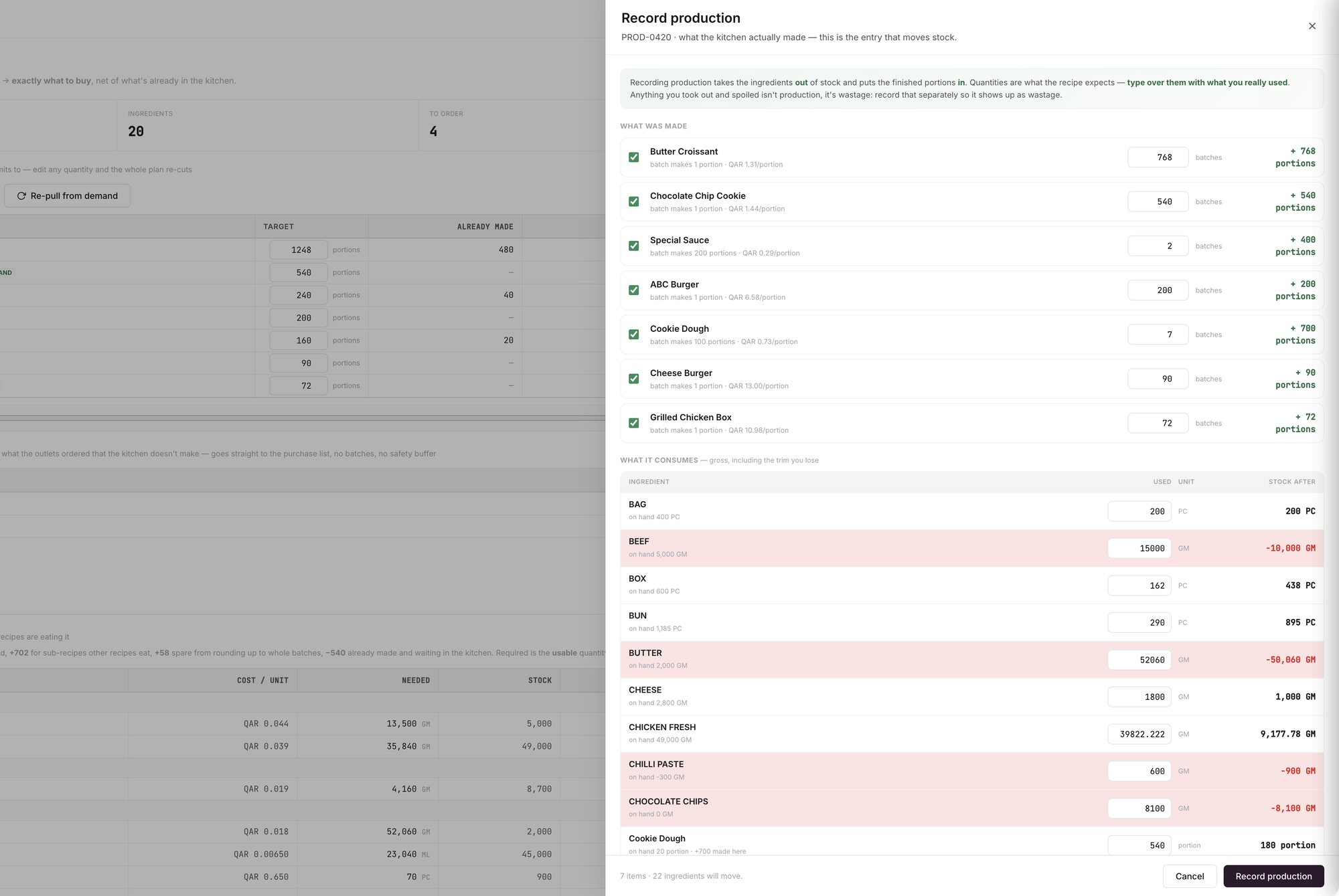
An example screen: the Record production drawer, with what was made at the top and what it consumes below.
What happens to stock?
Each ingredient comes out of stock at the gross quantity, trim included. Its history gets a Production Out line with the run's reference.
Each finished recipe goes into stock as portions, at the recipe's cost, and its history gets a Production In line.
A sauce or dough that another recipe in the run uses appears in the ingredient list too, with a note of how much the run made.
To see it, open Stock and click History on any item.
What if food was spoiled?
⚠️ Watch out: Food you took out and spoiled is not production. Record it as wastage, so it shows up as wastage. Record wastage sits at the top of the Production Plan page. See how to track food waste.
What if the run is wrong?
Reverse the run. Do not delete it. See how to reverse a production run.
Related guides
Frequently asked questions
Did this guide answer your question?
Didn't find your answer?
Message us on WhatsApp or by email, and our team will get back to you.
Your kitchen's stock, recipes and costing, with numbers from real records.

