You can bring an existing recipe costing sheet into Wady Central with the Import costing sheet button on the Recipes page. The import takes a single-sheet CSV or text pasted from the clipboard, splits it into ingredients and recipes, and shows a preview before anything is imported. Sheets differ, so a sheet may not import on the first try, and the preview shows which rows need fixing. This guide covers how to prepare the sheet, how to read the preview, and what to do if a sheet doesn't import.
Key takeaways
The Import costing sheet button is on the Recipes page.
Use a single-sheet CSV, or paste the sheet from the clipboard. The import splits it into ingredients and recipes.
The preview lists what it found under INGREDIENTS, RECIPES and SKIPPED before anything is imported.
After the import, compare a few recipes with your sheet.
What is the costing sheet import for?
If your costing already lives in a spreadsheet, the import saves you retyping every ingredient and recipe. It needs two parts: your ingredients, and your recipes built from them. If both sit on one sheet, the import separates them for you. It is part of recipes and costing.
⚠️ Watch out: The preview checks that rows can be read. It cannot tell whether a price in your sheet is right, so compare a few recipes with your sheet after the import.
How do you import a costing sheet in Wady Central?
Prepare one sheet. Put your ingredients and your recipes on a single sheet and save it as CSV, or copy the cells. Spell each ingredient the same way everywhere it appears.
Open Recipes in the sidebar and click Import costing sheet, the green button at the top right, beside Export costing and New recipe.
Add your sheet in the import window: a single-sheet CSV, or text pasted from the clipboard.
Read the preview. INGREDIENTS and RECIPES list what the import found, each with a count. SKIPPED lists the rows it cannot use, so problem rows show up before anything is imported. Compare the counts with your sheet.
If rows appear under SKIPPED, tick Skip unusable rows. That enables the Import recipes button. You can also fix those rows in your sheet and add it again.
Click Import recipes. Nothing goes in until you click this button.
Open a few recipes and compare the cost per portion with your sheet.
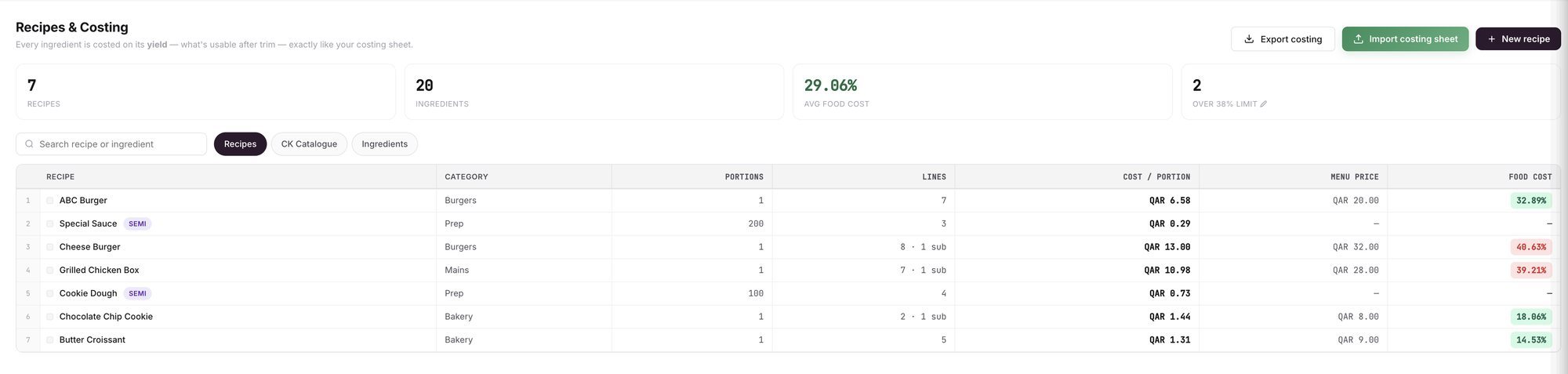
An example screen: the Recipes page, with Import costing sheet at the top right.
If your sheet doesn't import
Fix the rows under SKIPPED in your sheet and add it again. If it still doesn't import, message us on WhatsApp at +974 7000 7658 or email wecare@thewady.com. For the rest of your setup, see how to set up your Wady Central account.
Related guides
Frequently asked questions
Did this guide answer your question?
Didn't find your answer?
Message us on WhatsApp or by email, and our team will get back to you.
Your kitchen's stock, recipes and costing, with numbers from real records.
More guides in this topic
How do I cost a recipe with yield and trim loss?
How do I see each dish's food cost and margin?

