Restaurant inventory spreadsheet or software: when does Excel stop working?
By Asaad Al Hashmi, Founder and CEO of Wady

A restaurant inventory spreadsheet works while one person runs one kitchen and prices rarely move. Excel stops working when you have more than one outlet or a central kitchen, when supplier prices change, when one typing error goes unnoticed, or when month-end takes days. At that point, inventory software is the better tool.
This guide covers what a good Excel inventory sheet contains, the five signs you have outgrown it, an Excel against software comparison, and how to move without losing your data.

A spreadsheet is where most kitchens start counting stock.
Key takeaways
A good restaurant inventory sheet has nine columns: item, unit, pack size, par, opening, received, wastage, closing and unit cost.
Five signs you have outgrown Excel: more than one outlet, a central kitchen, price changes, typing errors, and a month-end that takes days.
Excel is free and flexible. Software wins once many people, many outlets and moving prices are involved.
You can move to software without losing data: your costing sheet imports as it is, and you can export everything any day, free.
What does a good Excel restaurant inventory sheet have?
If you are going to use a restaurant inventory template in Excel, put one row per item and these nine columns in it:
Column | What it holds |
|---|---|
Item | One name per ingredient, spelled the same way everywhere |
Unit | The unit you count in: kg, litre, piece, tray |
Pack size | What one pack holds, so a case converts to kilos or pieces |
Par | The level you want on the shelf, so you know when to reorder |
Opening | The count at the start of the period |
Received | Everything delivered during the period |
Wastage | What was thrown away, spoiled or dropped |
Closing | The count at the end of the period |
Unit cost | What one unit costs you now |
The sheet has to close properly: opening, plus received, minus wastage, minus what you used, equals closing. If you add one more column for usage, it gives you the figure you need for food cost. For the method, see how to calculate food cost.
A few habits keep a sheet honest:
Count in one unit per item. Switching between kilos and grams in the same column is how errors start.
Leave a cell blank when you did not count it. A blank and a zero are different things.
Keep one master copy. Two copies of the file mean two sets of numbers.
Count on a fixed day. A weekly count on the same day shows a trend. A random count shows noise.
For counting steps, see the guide to a restaurant stock count.
When does Excel stop working for restaurant inventory?
Excel works for a single kitchen with a short item list, one person doing the count and prices that move slowly. Here are the five signs you have outgrown it.
1. You have more than one outlet
Every outlet needs its own count, and someone has to merge the files. Each merge is a retype, and each retype is a new chance to be wrong. When two outlets use two versions of the sheet, nobody can say which copy is right.
2. You run a central kitchen
A central kitchen sends stock to outlets. In a spreadsheet, stock that leaves the kitchen disappears from one tab and may never appear on another. On paper it is gone. In fact, nobody knows whether it arrived. Production adds a second problem: ingredients go out and a finished product comes in, and a sheet has no easy way to record both sides of that.
3. Your prices change
A supplier raises a price. Your unit cost column does not know. Your recipe costs move with the price, and you find out when the invoices arrive. A sheet is only as current as the last person who updated the cost.
4. Typing errors get through
A spreadsheet accepts anything you type. A real example from a Qatar kitchen group: 336 typed as 0.336. Nothing questioned it at the time, and every report after it was quietly wrong. One wrong digit can run for a month, because a cell never asks "is this number odd?".

The Wady Central daily brief flags odd numbers and stock below zero. An example screen, not a real customer's numbers.
5. Month-end takes days
Opening, plus what came in, minus what went out, should equal closing. When it does not, finding out why takes days, because the answer is spread across the chef's memory, a WhatsApp group, the delivery book, a spreadsheet on one laptop and an invoice that arrives weeks later. If checking one ingredient takes hours, the sheet is no longer saving you time.
One sign alone is a warning. Two or more means the cost of the sheet is higher than the cost of software.
Excel vs inventory software for restaurants: what is the difference?
Excel spreadsheet | Inventory software | |
|---|---|---|
Cost to start | Free, you may already own it | A monthly fee per outlet or kitchen |
Several outlets | Separate files, merged by hand | One account, every outlet in it |
Central kitchen and transfers | Stock leaves one tab and may never arrive in another | Every movement is recorded and confirmed at the other end |
Price changes | Updated by hand when someone remembers | Recipe costs move when a price moves |
Typing errors | Accepted without question | Odd numbers can be questioned as they are typed |
Who changed what | Often unknown | Each change is dated, with a reason |
Month-end | Days of checking | Balances per item |
Best for | One small kitchen, short item list | Several outlets, a central kitchen, moving prices |
Excel wins on cost and flexibility. Software wins once more than one person touches the numbers. For a wider look at what is on the market in Qatar, see the best restaurant inventory management software in Qatar, and for the full picture of how groups manage stock, see restaurant inventory management.
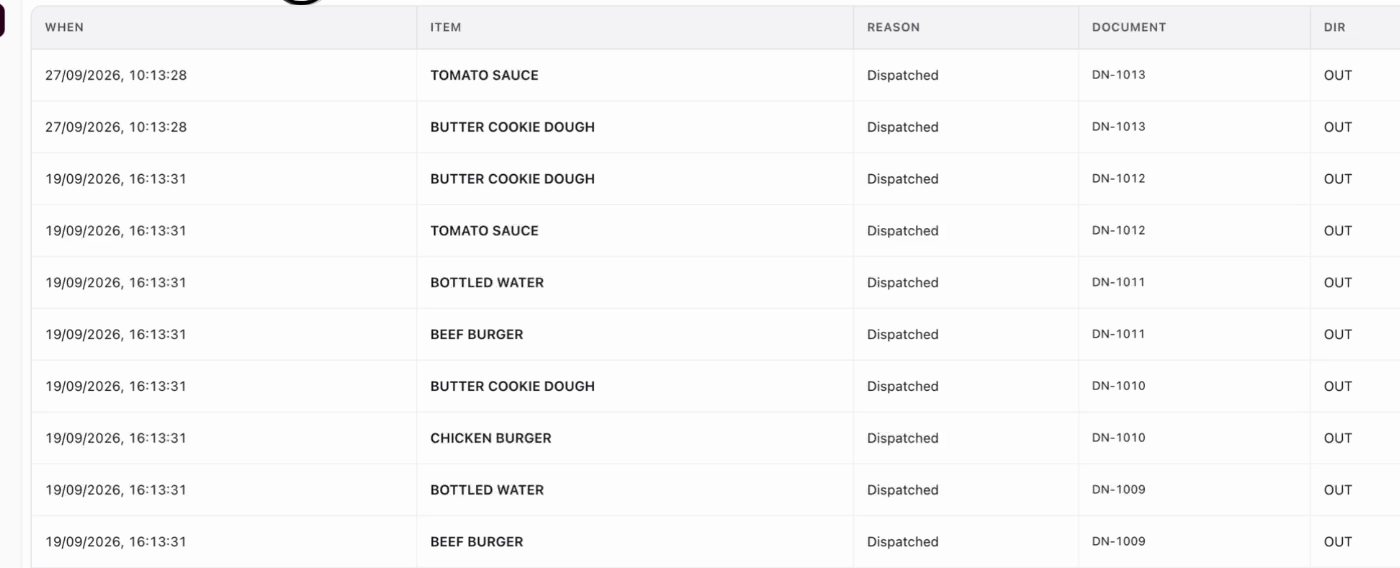
Every stock movement on one ledger, with its reason and document. An example screen.
How do you move from Excel to inventory software without losing data?
You do not start from zero. Move in five steps:
Clean the sheet first. One name per item, one unit per item, no duplicate rows.
Pick one kitchen and two outlets to start. Do not switch the whole group on day one.
Load your item list and your costing sheet. Good software takes the sheet you already have, so the work you did is not lost.
Count once, then run both side by side for a short period. Check that the software closing matches your sheet.
Keep your export. Make sure you can take all your data out any day, so you are never locked in.
Keep your POS and accounting as they are. Inventory software works alongside them.
How Wady helps with restaurant inventory
What does Wady Central do for stock?
Wady Central is Wady's paid product for restaurant groups, central kitchens and catering companies. It puts stock, recipes, purchasing and cost control in one system, so nothing is typed twice. It is used by more than 100 businesses in Qatar, including Crave Holdings and OMC. For stock, it gives you:
Every movement on one list. Nothing moves stock without a line, and each line carries its reason and the document behind it.
Counts on paper or on screen. A blank means not counted, and only a 0 means none. Differences are reviewed with likely typos first.
Odd numbers questioned as they are typed. The kind of error that turns 336 into 0.336 gets flagged.
Recipe costs that stay true. Costs are recalculated the moment a price moves, and price rises and falls are flagged on delivery.
Month-end that balances, per item.
Your costing sheet imports as it is. You keep the work you did in Excel.
See the stock side in detail on the Wady Central stock page.
What does Wady not do?
Wady Central has no POS connection yet. It works alongside the POS you already use. It runs in English today. An Arabic interface and a mobile app are planned, not live.
How much does it cost, and who is it for?
Current prices are on the pricing page, with no VAT in Qatar. It suits a single cafe up to a multi-branch group that has outgrown its spreadsheet. You can export all your data any day, free.
FAQ about restaurant inventory in Excel
Is there a free restaurant inventory template for Excel?
Yes, you can build one in minutes with the nine columns above: item, unit, pack size, par, opening, received, wastage, closing and unit cost. It is a fair start for one small kitchen.
Can a small restaurant stay on Excel?
Yes. If you have one kitchen, a short item list and one person counting, Excel is a sound choice. Move when you hit two or more of the five signs.
What is the biggest risk of using Excel for inventory?
Silent errors. A spreadsheet accepts a wrong digit without a question, so one mistake can run through every report after it.
Will I lose my data if I switch to software?
No. Your costing sheet imports as it is, and you can export all your data from Wady any day, free.
Does inventory software replace my POS?
No. Wady Central works alongside your POS and accounting. It has no POS connection yet.
Ready to leave the spreadsheet behind?
If two or more of the five signs sound familiar, see how Wady Central handles your stock on your own setup. Message the team and we will walk you through it. More on Wady Central stock.
Related articles
Your kitchen's stock, recipes and costing, with numbers from real records.


