What is the best central kitchen inventory software, and what should it do?
By Asaad Al Hashmi, Founder and CEO of Wady

The best central kitchen inventory software is the one that follows your stock through the whole loop, from the outlet order to the outlet confirming arrival, without anyone typing the same number twice. It must turn outlet orders into one production plan, record every movement with a reason, and close the loop when goods arrive at the branch.
This guide walks through the 7 steps of a central kitchen's stock loop, what goes wrong at each one, and a checklist you can use to judge any system, including Wady Central. If you are new to the topic, start with what a central kitchen is.
Key takeaways
A central kitchen's stock moves through 7 steps: outlet orders, consolidated demand, production plan, purchasing, receiving, production and dispatch, and arrival at the outlet.
Most losses happen between steps: orders retyped, transfers retyped, short deliveries, and arrivals nobody confirms.
Good software records each step once, so the output of one step becomes the input of the next.
Wady Central runs this loop, and works alongside your POS.
What are the 7 steps of a central kitchen's stock loop?
Every central kitchen, whatever it cooks, runs the same loop. Software has to cover all seven, because a gap at any one of them breaks the numbers for the rest.
Outlets order. Each branch asks the kitchen for what it needs.
Demand is consolidated. The kitchen sees every outlet's order on one sheet.
Production is planned. The chef decides what to cook, after taking stock on hand off the list.
Purchasing buys. Ingredients the kitchen is short of are ordered from suppliers.
The kitchen receives. Deliveries from suppliers are checked in.
The kitchen cooks and dispatches. Ingredients go out, product comes in, and each outlet gets its goods with a delivery note.
Outlets confirm arrival. The branch confirms what came.
What goes wrong at each step?
Operators in Qatar describe the same problems, in the same places.
Steps 1 and 2: the same order is typed again and again. Outlets send orders on paper, WhatsApp or Excel. The kitchen rewrites them into one sheet. One operator described it plainly: every night someone sits down and writes all the orders down. What the kitchen wants is one page, with items down the side, outlets across the top and totals at the end.
Step 3: the plan ignores what is already on the shelf. If the sheet does not subtract stock, the kitchen either overcooks or runs short.
Step 4: ordering is guesswork. Purchasing buys from a list that no one built from the production plan.
Step 5: receiving means typing. Every delivery is keyed in by hand, and one wrong digit, such as 336 typed as 0.336, can run for a month while every report after it is quietly wrong.
Step 6: transfers are retyped. The order becomes a production sheet, then a transfer, then a delivery note, each typed by a person. Millilitres meet litres, a comma lands where a decimal point belongs, a production entry is forgotten. The recipe says 100 grams and the cook used 200, so the monthly count never matches the system.
Steps 6 and 7: short deliveries, and nobody confirms arrival. Stock leaves the kitchen and is gone on paper. In fact, nobody knows whether it arrived complete. Shortages surface weeks later, if at all.

Outlet orders added up into one demand sheet in Wady Central. An example screen.
What should central kitchen inventory software do?
Use this checklist. If a system cannot do an item, ask what you would do by hand instead.
[ ] Outlets order in an app, and every order is recorded with who placed it and when.
[ ] All demand on one sheet, by product or by outlet, counting only what is still needed.
[ ] The chef can edit quantities down to what the kitchen can make, and the totals move with them.
[ ] Production plans from real orders, minus what is in stock, with sub-recipes pulled in and rounded to real batches.
[ ] Purchase lists come from the plan, and any supplier can be ordered, on the platform or not.
[ ] Receiving is confirming, not typing.
[ ] A production run records ingredients out and product in, and what the cook used beats what the recipe said.
[ ] The delivery note prints itself, from the order, with no retyping.
[ ] Outlets confirm arrival, and shortages and returns are recorded with their value.
[ ] An in-transit list shows value and age of anything not yet confirmed.
[ ] Every stock balance opens to its full history, and every movement has a line, a reason and a document.
[ ] Odd numbers are questioned as they are typed, such as units and decimals.
[ ] Recipe costs move when a supplier price moves.
[ ] It works alongside your POS and accounting, and you can export your data any day.
For the wider picture of stock across branches, see restaurant inventory management.
Step by step: manual way against software
Step | The manual way | With software |
|---|---|---|
1. Outlets order | Paper, WhatsApp or Excel | A few taps in the app, every order recorded |
2. Consolidate demand | Someone rewrites every order into one sheet each night | One sheet, by product or outlet, built from the orders |
3. Plan production | Chef estimates from memory | Plan from real orders, minus stock on hand |
4. Purchasing | A list typed from the plan | Purchase list built from the production plan |
5. Receive | Delivery book, then retyped | Confirm the delivery, no typing |
6. Cook and dispatch | Production sheet, transfer and note typed separately | Run recorded once, delivery note prints itself |
7. Outlet confirms | A phone call, if anyone remembers | Outlet confirms arrival in the app, shortages recorded |

Every dispatch ends at an outlet door, where someone has to confirm what arrived.
How do you choose between systems?
Ask for a demo on your own flow, not a feature tour. Three tests separate a loop from a pile of features.
Enter an outlet order, then follow it. Does it reach the production plan, the delivery note and the outlet's confirmation without a single retype?
Make a mistake on purpose. Type 0.336 instead of 336. Does the system question it?
Ask a number why. Pick any stock balance and ask where it came from. The answer should be on the screen.
Beware of tools that cover only one corner, such as ordering or counts, and leave you to join the rest in a spreadsheet. A group choosing for several outlets should also read how multi-branch restaurants centralize purchasing, and compare options in the guide to restaurant inventory software in Qatar.
How Wady helps with central kitchen inventory
What does Wady Central do?
Wady Central is Wady's paid product for multi-branch groups and central kitchens, built in Qatar. It runs the loop above so that nothing is typed twice.
Outlets order in the app.
The kitchen plans from all demand on one sheet.
Purchasing buys from any supplier, on Wady or not.
The kitchen receives by confirming, not typing.
The kitchen cooks and sends, and the delivery note prints itself.
Outlets confirm arrival, so nothing is left in the air.
See outlet orders and production for the detail.
What does it not do?
It does not replace your POS or accounting. It works alongside them, and there is no POS API yet. Today Wady Central is in English only, runs in any browser on laptop or tablet, and an Arabic version and a mobile app are planned.
Who is it for, and what does it cost?
It suits restaurant groups, central kitchens and catering companies. Current prices are on the pricing page, with no VAT. More than 100 businesses in Qatar already use Wady, including Crave Holdings and OMC.
How do you start?
Start with your kitchen and two outlets this month.
Wady sets up your kitchen, outlets and suppliers with you.
Your product list and costing sheet go in as they are.
Your outlets place real orders, and your team is trained.
Your suppliers and prices stay as they are, and you can export all your data any day, free. A walkthrough on your own setup takes 20 minutes.
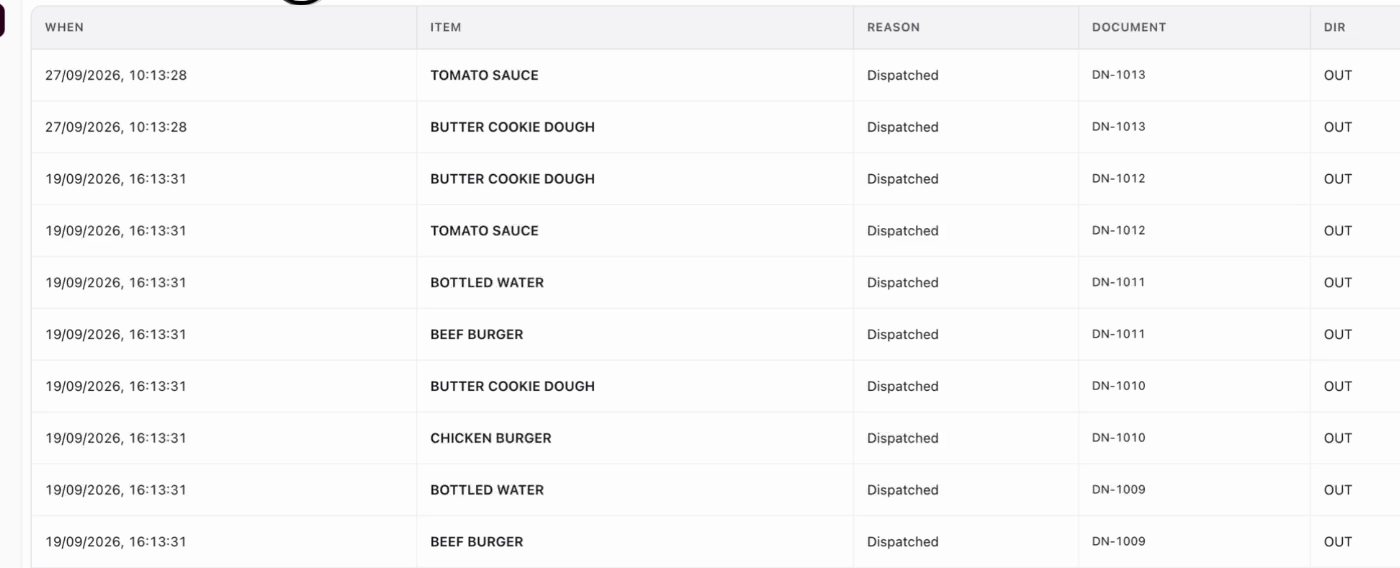
Every stock movement on one ledger, with its reason and document. An example screen.
FAQ about central kitchen inventory software
What is central kitchen inventory software?
It is a system that records a central kitchen's stock through the whole loop: outlet orders, production planning, purchasing, receiving, dispatch and arrival at the outlet. Each step feeds the next, so no one retypes an order or a transfer.
What is commissary inventory?
Commissary is another word for a central kitchen, and commissary inventory is the stock it holds and sends to outlets. It needs the same controls: every movement recorded, with a reason and a document.
Can outlets order from the central kitchen in an app?
Yes. In Wady Central outlets order in the app, a few taps each, and every order is recorded with who placed it and when.
Do I need to replace my POS?
No. Wady Central works alongside your POS and accounting. There is no POS API yet.
Is Wady Central available in Arabic?
Not yet. It is English only today. Arabic and a mobile app are planned.
How much does it cost?
Current prices are on the pricing page, with no VAT.
Related articles
Best restaurant inventory management software in Qatar
See it on your own setup
Message Wady for a 20 minute walkthrough of Wady Central on your kitchen and outlets.
Your kitchen's stock, recipes and costing, with numbers from real records.


